Facilities can now access audit logs for Template updates in FYDO. These logs will include the option to download the updated template, enabling users to search superseded versions if necessary.
Please note that this Download feature applies only to templates uploaded after this update and will not affect historic data.
Checkers for QLD Health Data Extracts
Additional checkers have been added to assist facilities accommodating Public Contracted Patients. These new checkers aim to reduce data extraction errors that occur when hospitals admit patients contracted from the public sector.
HBF Dental Claims
HBF has requested structural changes to the way dental claims are transmitted via ECLIPSE for continued electronic acceptance. FYDO has now been updated to continue accommodating the electronic submission of dental claims to HBF via ECLIPSE.
New API Parameter Added
The EpisodeDetailReportList API can now have cancelled episodes filtered out using the “ExcludeCancelledEpisodes”: “True” parameter. This is to match the Episode Detail Report when also filtering out Cancelled Episodes.
FYDO Hospital Update – 22/02/2024
New Theatre Roster Features
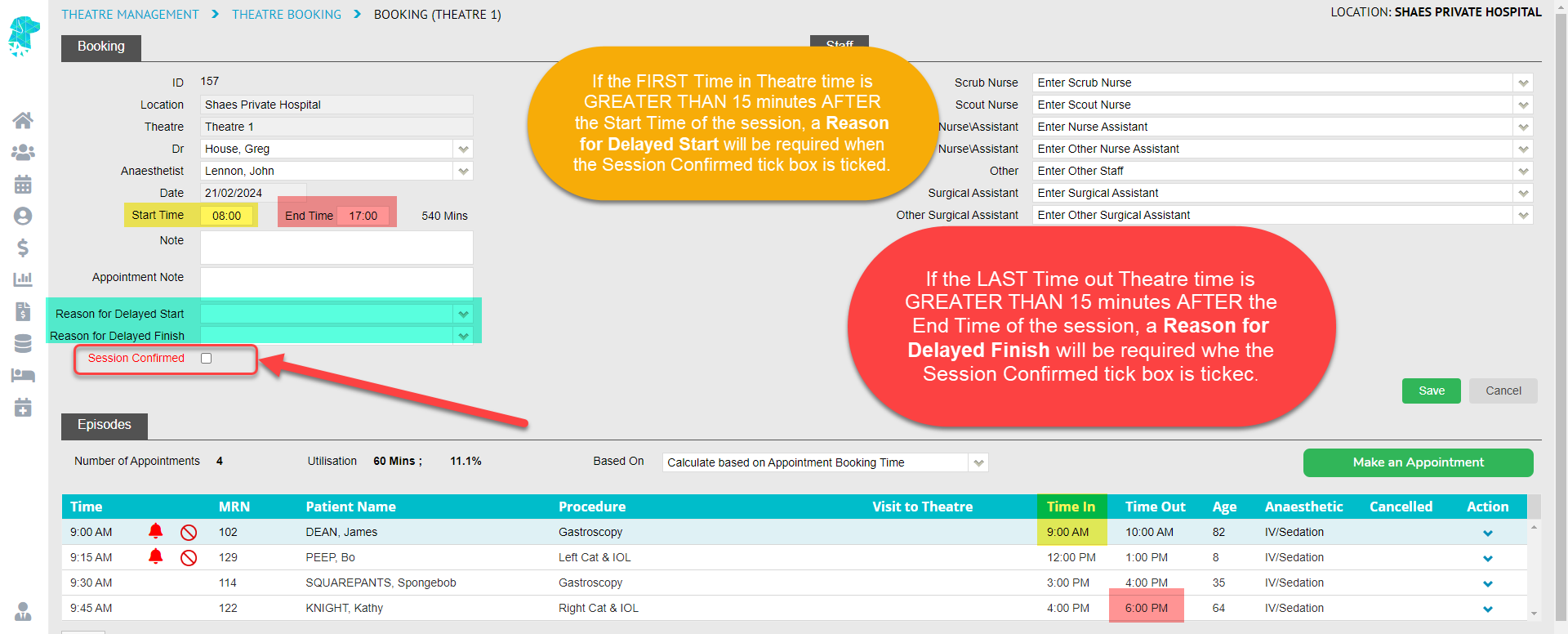
Facilities using the Session Confirmed tick box in the Theatre Rosters must now provide a Reason for Delayed Start and Reason for Delayed Finish if the Time In and/or Time Out of theatre are delayed by more than 15 minutes. If the Time in Theatre for the first patient is more than 15 minutes AFTER the session’s Start Time, a Reason for Delayed Start must be provided before clicking the Session Confirmed tick box. Similarly, if the Time Out of Theatre for the last patient is more than 15 minutes AFTER the session’s End Time, a Reason for Delayed Finish is required before ticking Session Confirmed.
Theatre Roster – Make an Appointment Function
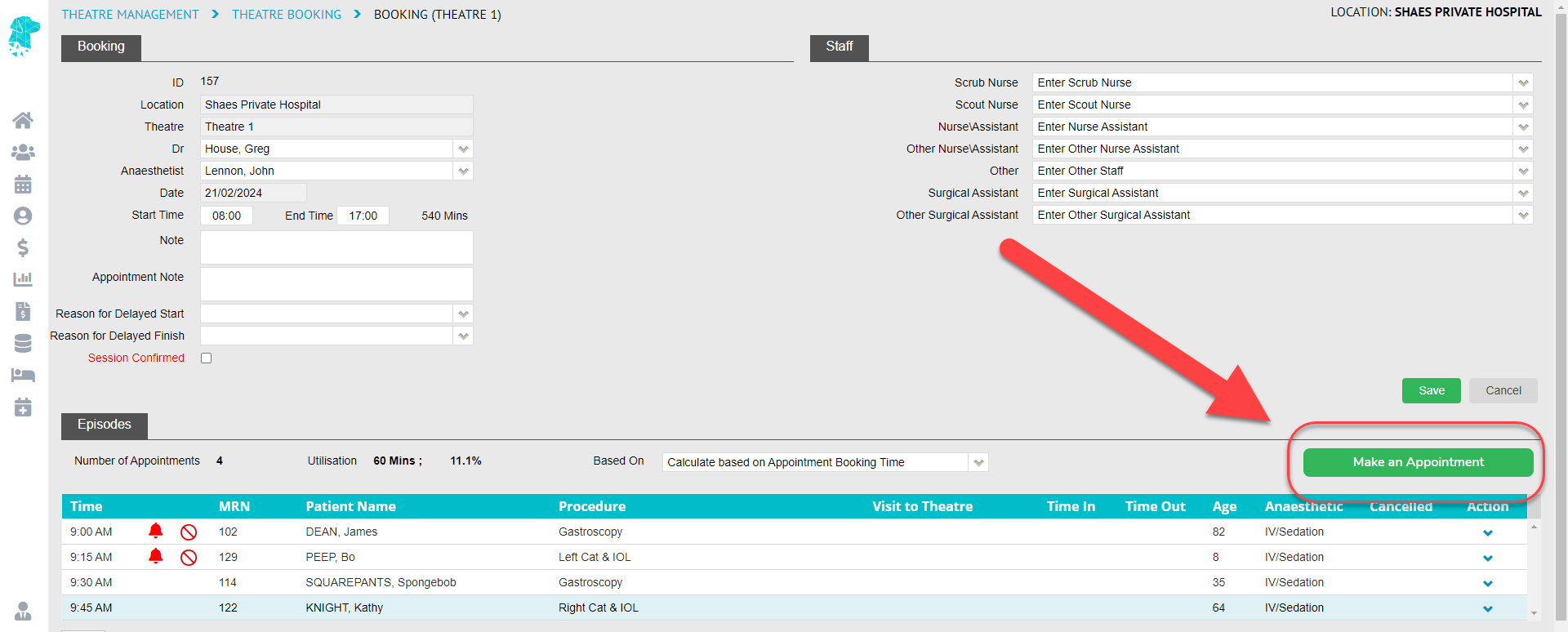
A convenient new feature has been added to the Theatre Roster > Theatre Booking Screen. With the introduction of the Make an Appointment button, users can seamlessly navigate to the corresponding roster in the Appointment Screen.
New Audit Logs
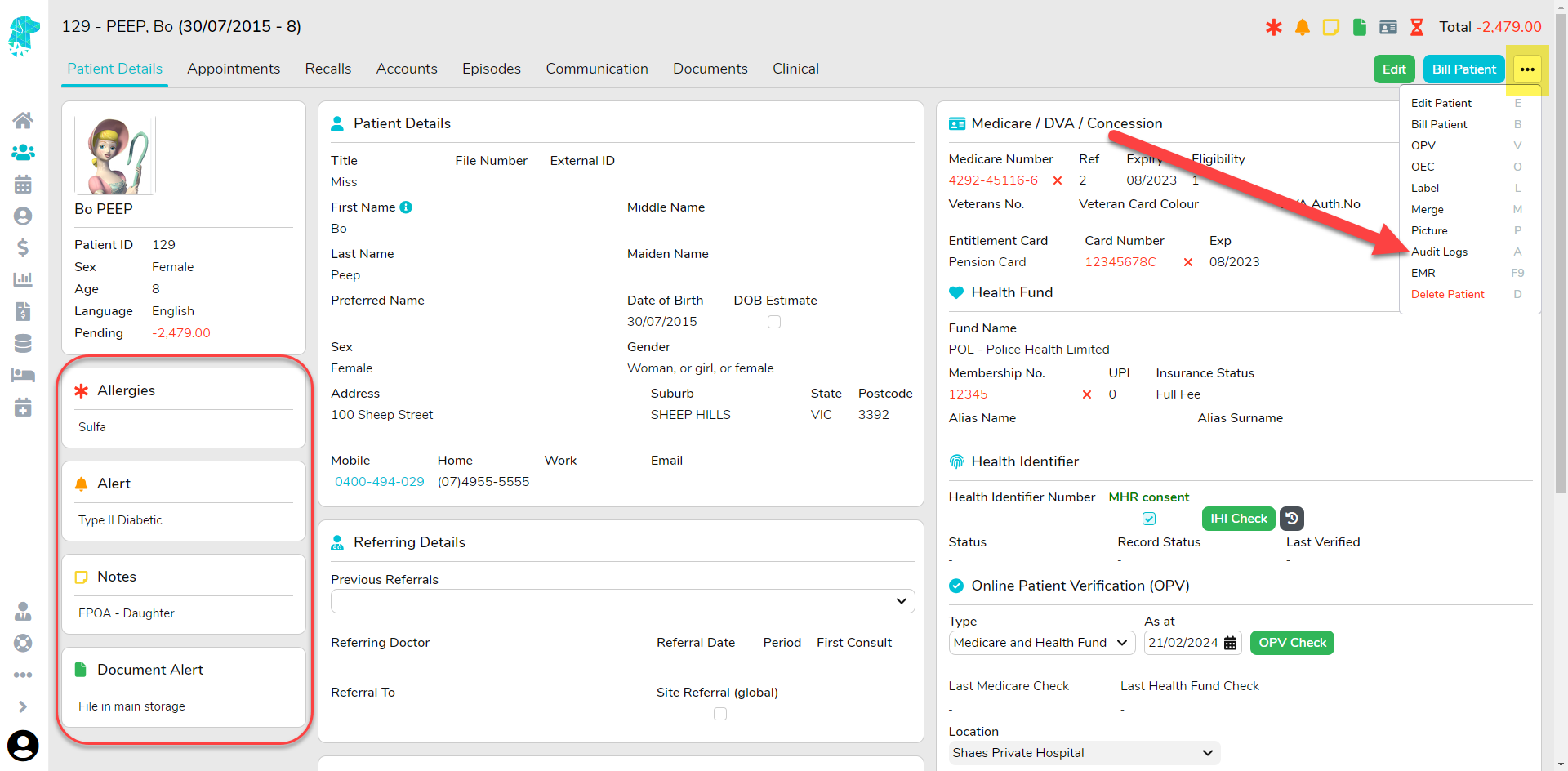
Audit logs have been added for the Allergies, Alert, Notes, and Document Alert fields on the patient screen. These logs can be accessed by using the menu in the top right corner of the Patient Screen and selected Audit Logs. Alternatively, they can be found in Settings > Logs by searching the patient’s MRN.
Episode Stats Report Additions
Extra fields have been added to the Episode Stats > Excel – Raw Data Export to assist facilities in collecting data. The additional fields are:
Billing Flag
Coding
OEC Received
OEC Checked
Admission Form Received
Chart Ready
IFC Complete
Patient Consent Received
Cancelled ID
Cancelled Description
Theatre Complete
Invoice on Hold ID
Invoice on Hold Description
Theatre Hold ID
Theatre Hold Description
Next Follow Up Date
Planned Time In Theatre
Bug Fix
The issue affecting the sorting of the Billing Status > Show Not Billed Interactive report has been resolved.
FYDO Hospital Update – 09/02/2024
Billing Status Report Improvements
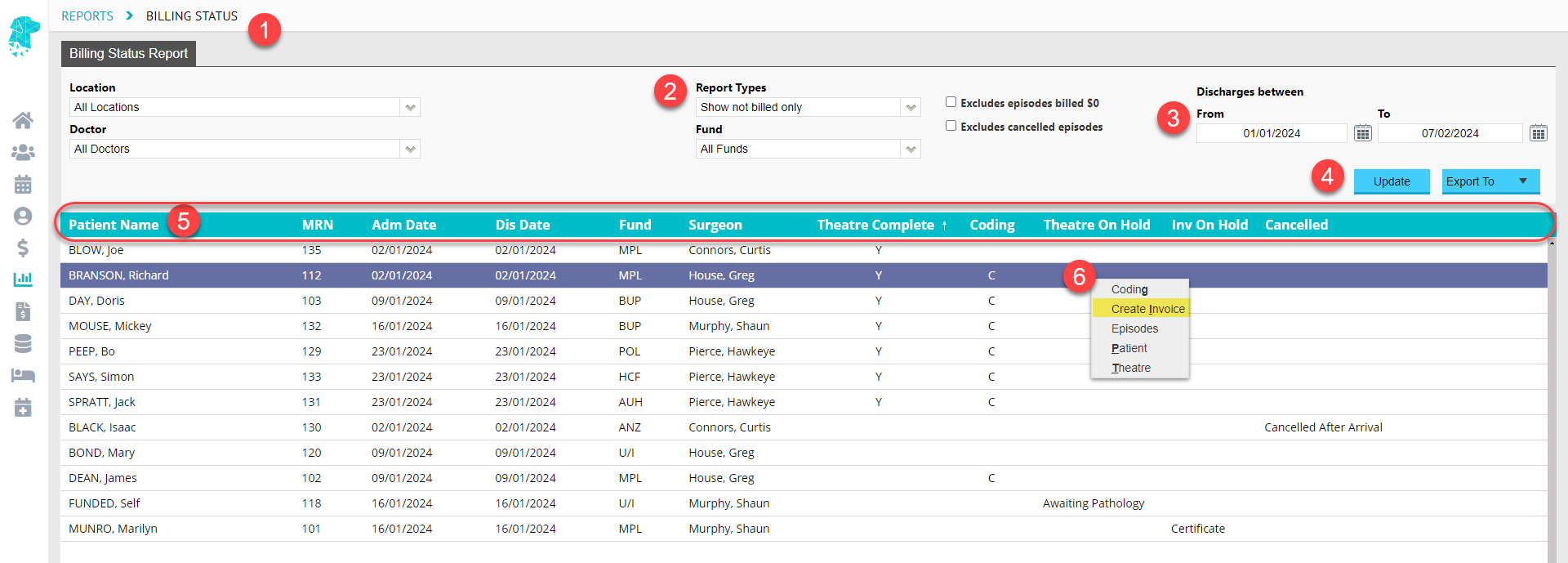
Prepare for a game-changing innovation in Hospital Billing! Introducing our new INTERACTIVE Billing Status – Show Not Billed Only Report, designed to streamline the billing process for optimal efficiency and user-friendliness!
Users can now conveniently bill episodes directly from one central location! Easily track outstanding episodes awaiting billing for a smoother workflow and faster revenue generation.
To make use of this fantastic new feature, users can follow these steps:
Navigate to Reports > Billing Status.
Select the Report Type of Show Not Billed Only.
Select the Date from and Date To.
Click Update.
Arrange the data to your preference! Utilise column headings, such as Patient Name, Admission Date, Discharge Date, Fund and Theatre Complete, for sorting.
For further convenience, select an episode and Right-Click to access a menu. From here, you can navigate to different pages to input required information. ALTERNATIVELY, you can also use this menu to CREATE INVOICE RIGHT FROM THIS SCREEN!
Additionally, On Hold and Cancelled reasons are displayed to assist in identifying episodes that may not be ready for billing, making this a comprehensive solution for your billing needs!
The original Billing Status > Show Not Billed Only Report can still be accessed by clicking Export to > PDF for users that still require a printed copy of this report with a time stamp.
Claiming Hospital > Not Yet Sent
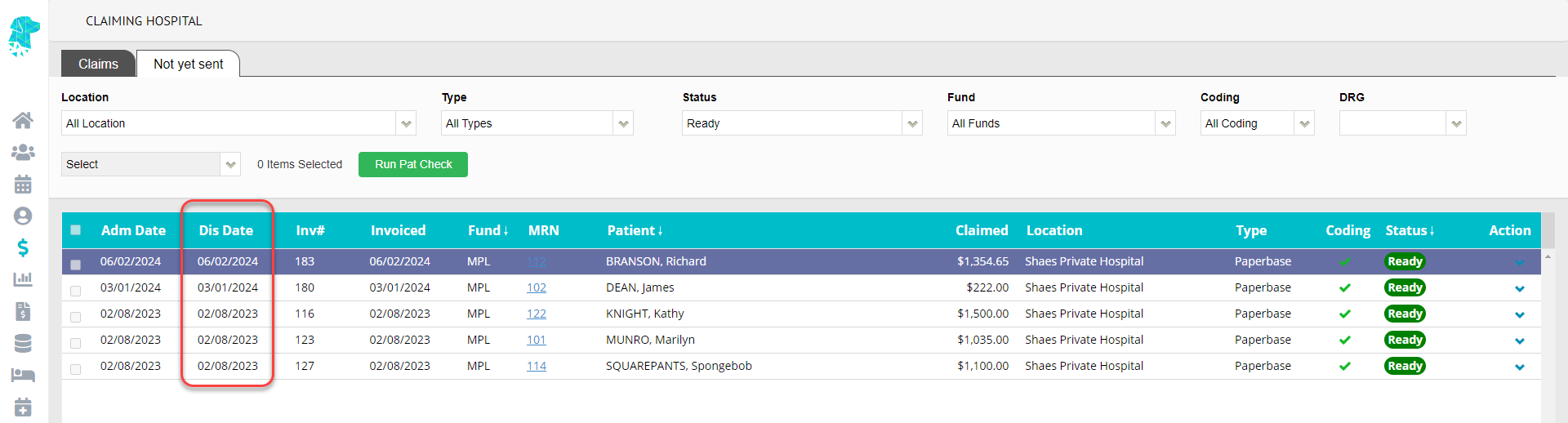
The Discharge Date has been added to the Claiming Hospital > Not Yet Sent tab.
New Permission Level
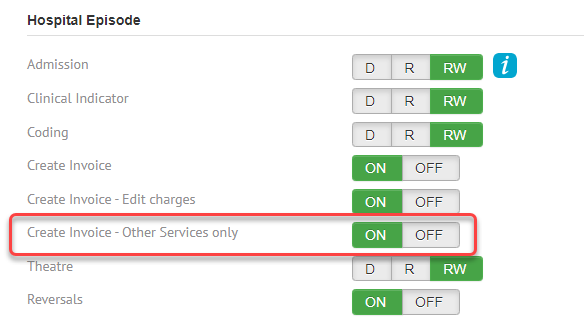
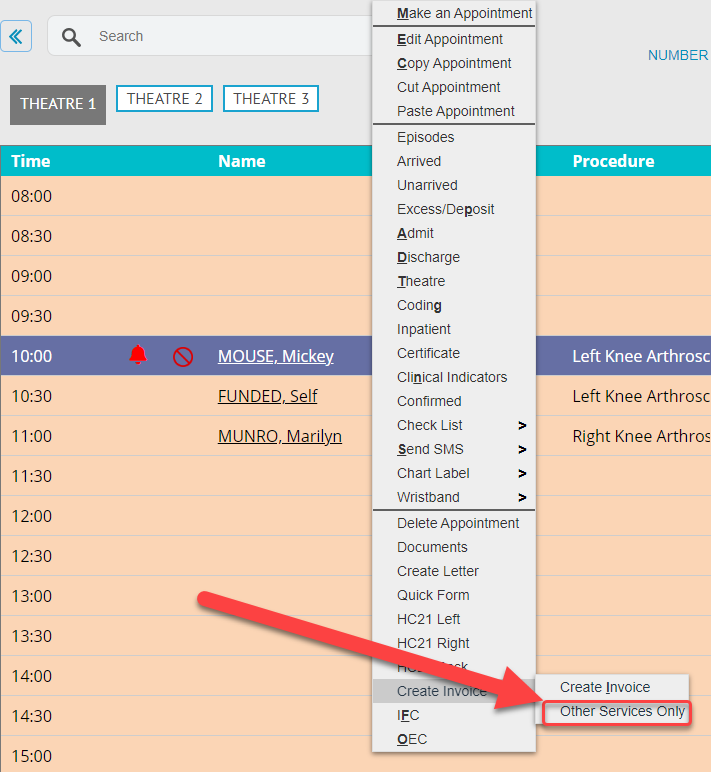
Users can now be given permission to Create Invoice – Other Services Only as a separate permission level from Create Invoice.
This permission level can be adjusted for all User Groups in Settings. It grants the ability to generate an Other Services Only invoice for any patient, including patients that have not yet been admitted or discharged.
Survey Settings
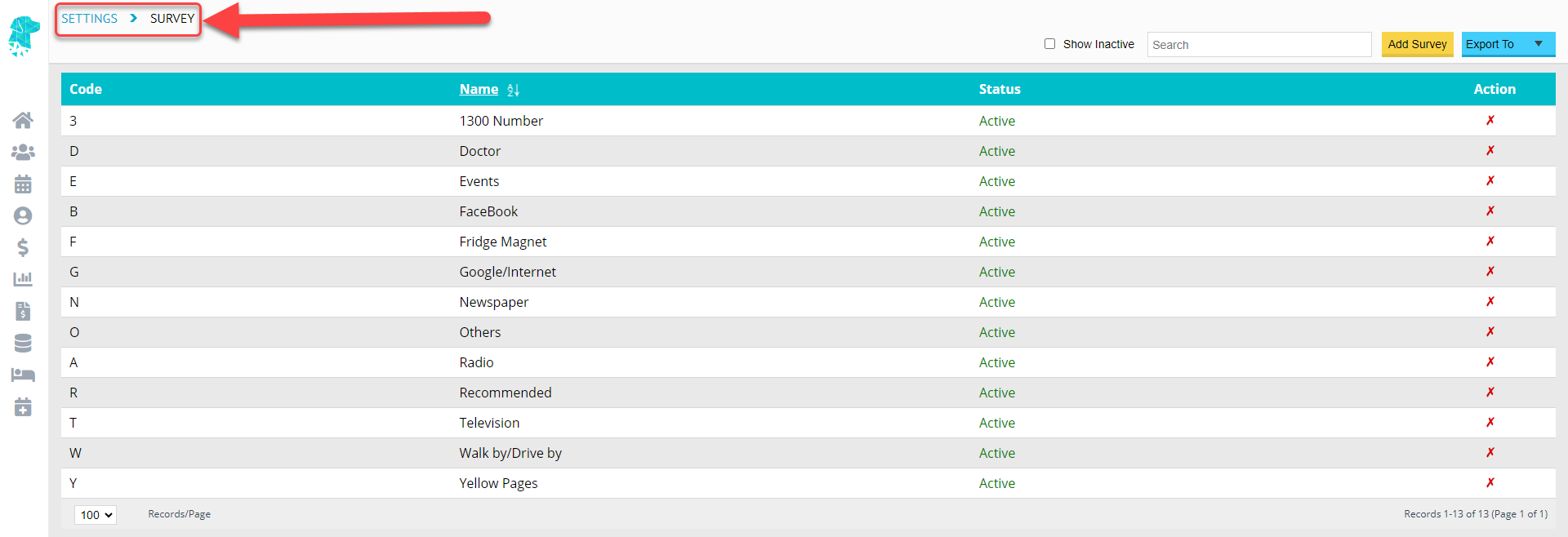
The list that facilities use to collate data, on how the patient came to know about the facility, is now customisable! Facilities can edit this list to include all relevant options for their needs. To make changes navigate to Settings > Surveys.
Raising a Support Ticket from FYDO
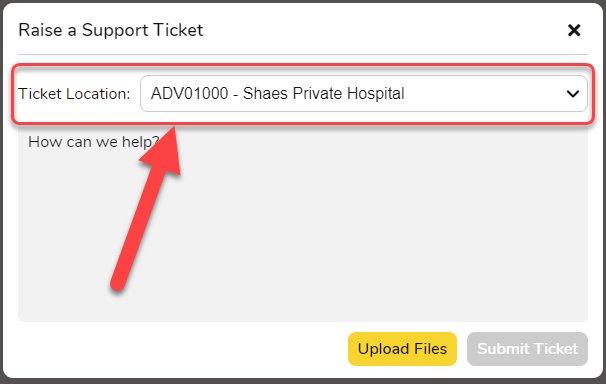
When raising a support ticket with FYDO, users will now be able to select the Location that the ticket is relevant to. This feature assists multi-location databases, or Clinic/Hospital databases, in being able to raise their support tickets for the location that the ticket is referring to.
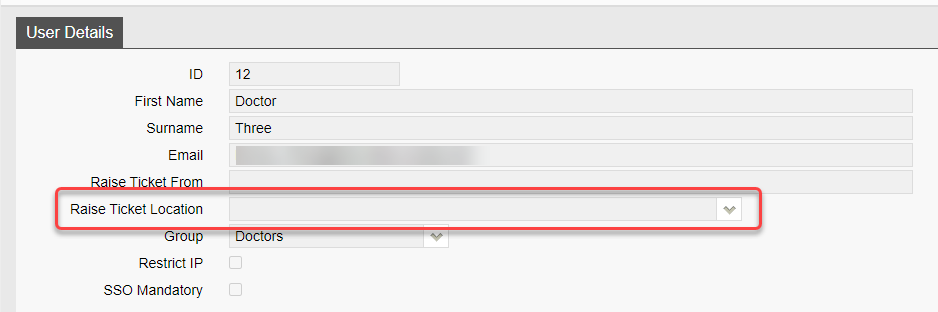
Default settings for this field can be entered, for the whole facility, in Settings > System Configuration by adding the required location to the Raise Ticket Location field.
The default settings can also be added at a User level, to ensure each user has the ticket populate with the location that is relevant to them, in Settings > Users by adding information to the Raise Ticket Location field.
FYDO Hospital Update – 25/01/2024
SMS Reply History
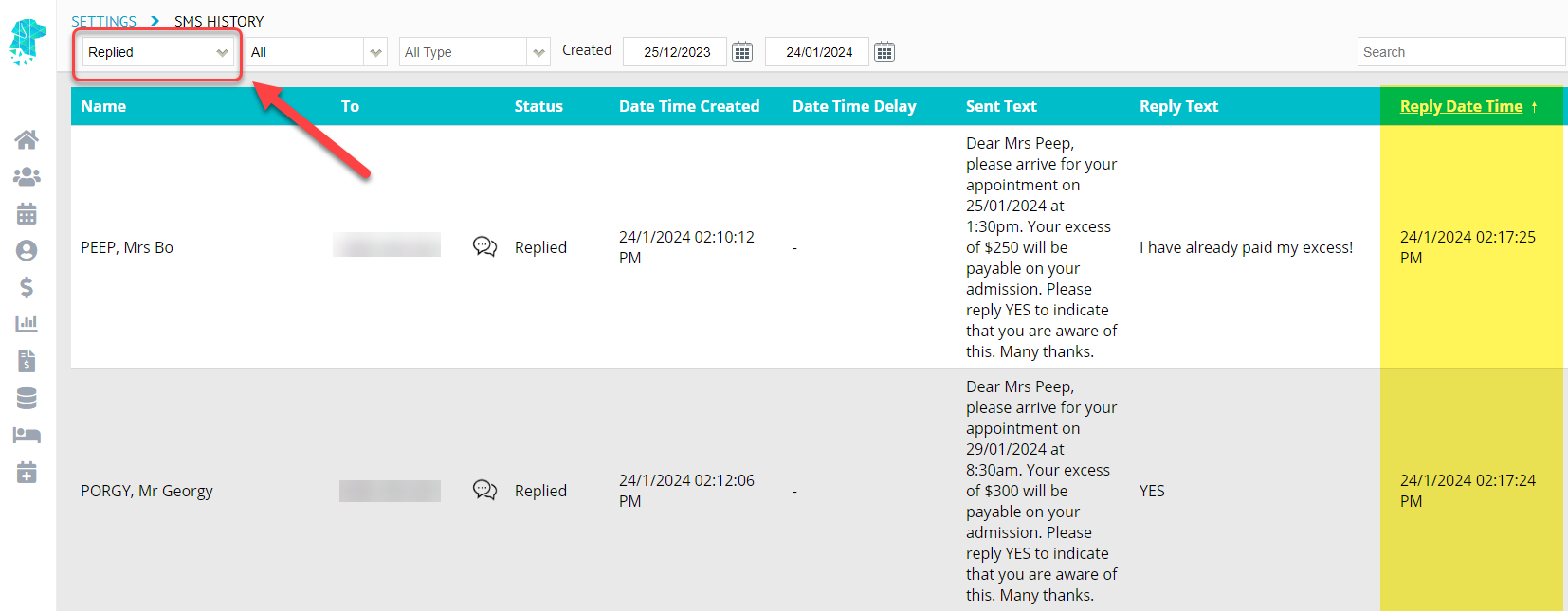
Users can now conveniently review SMS replies in chronological order, with the corresponding Reply Date and Time prominently displayed on the SMS History screen. To access this feature, navigate to Settings > SMS History and apply the Status filter “Replied”.
Reallocating Adjustments
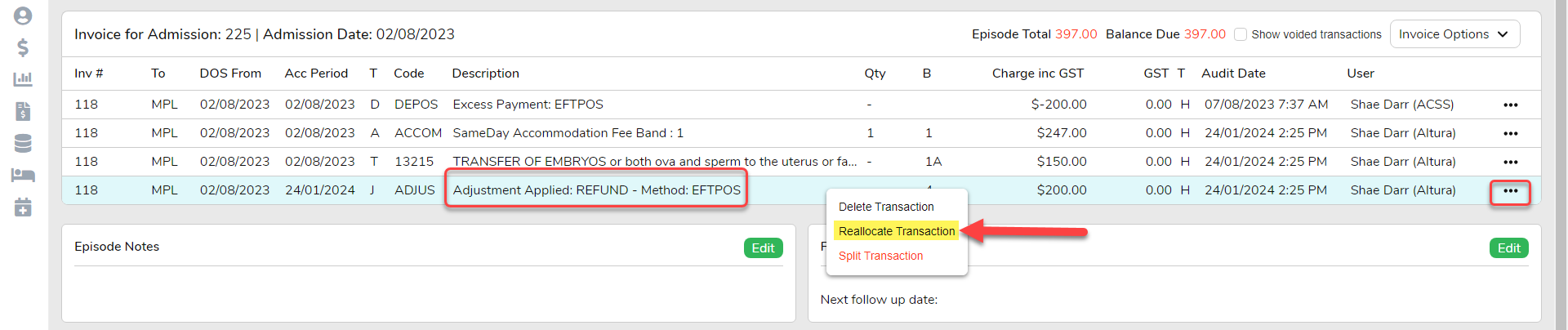
Adjustments can now be reallocated to another invoice, mirroring the same functionality that currently exists for reallocating deposits. To utilise this feature, simply navigate to the corresponding Episodes screen and right-click on the Adjustment line, or normal click on the three dots to the right of the screen, to select Reallocation Transaction.
Claiming Hospital – Not Yet Sent Tab
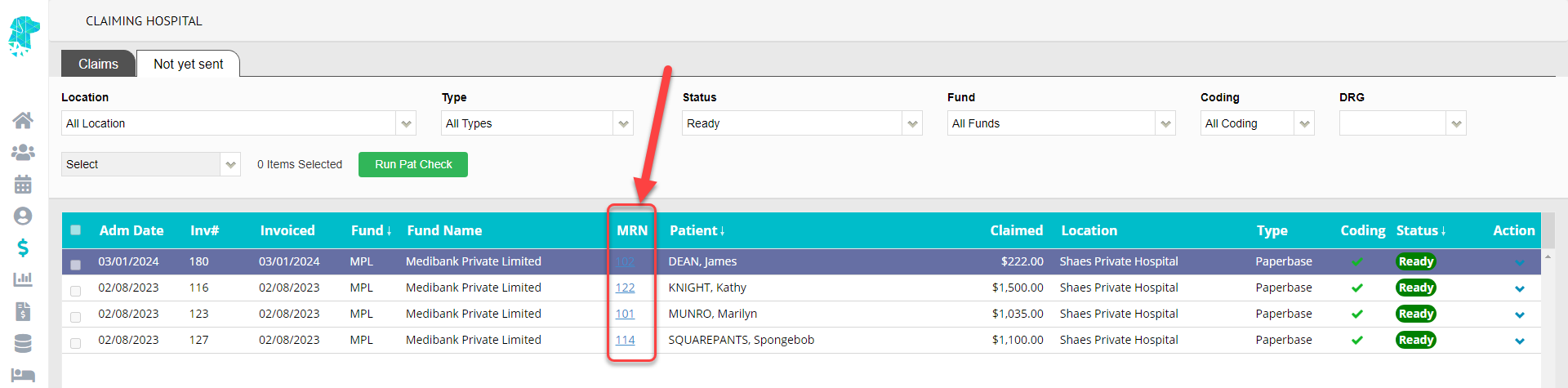
The MRN number will now be displayed on the Claiming Hospital > Not Yet Sent tab.
FYDO Clinic Update – 23/01/24
New IP Restriction Function
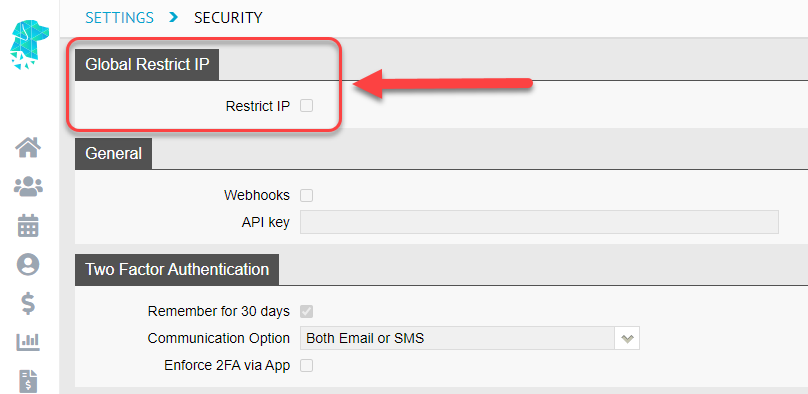
Clinics can now use the new Global Restrict IP function in Settings > Security to simultaneously restrict all users to a specific IP address. While the ability to restrict individual users is still available in Settings > Users, this new feature streamlines the process for applying IP Restrictions across the board. Only users with the required access levels will be able to make amendments to these settings.
Invoice Export Report Additions
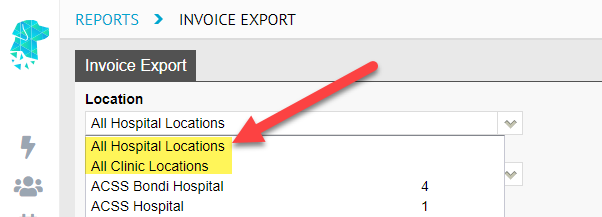
The Invoice Export Report can now be run for All Hospital Locations and All Clinic Locations AT ONCE! This new feature allows multi-location facilities to easily collate invoice data across all their sites simultaneously.
Bug Fixes:
The issue some users were experiencing where an Entitlement Card was showing as expired in error has been resolved.
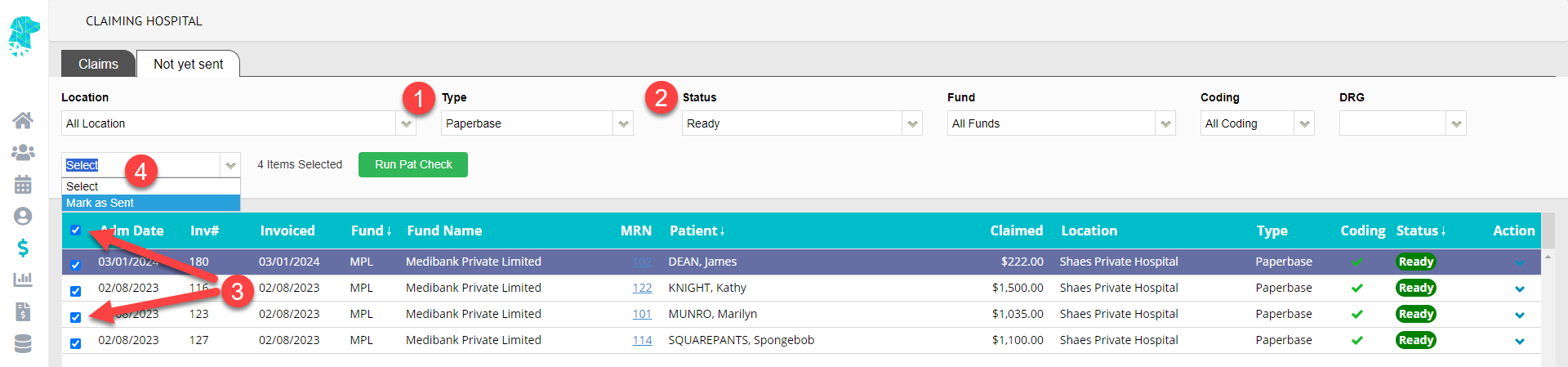
We’ve added a new feature to enhance efficiency in our Claiming Hospital > Not Yet Sent tab. Once the claims have been manually sent to the health funds, users will now be able to mark the complete Paperbase Claims as sentIN BULK!
The easiest way to do this is to navigate to the Claiming Hospital > Not Yet Sent tab and:
In the Type field, choose Paperbase
In the Status field, select Ready
Choose claims individually, using the left tick box on each individual line, or select all by utilising the Select All tick box at the top of the column
In the Select dropdown, choose Mark as Sent
This will mark the Paperbase Claims as sent in the same manner as before, and the corresponding audit trail will be displayed in the patient’s episode audit notes.
Theatre Rosters Report Enhancements
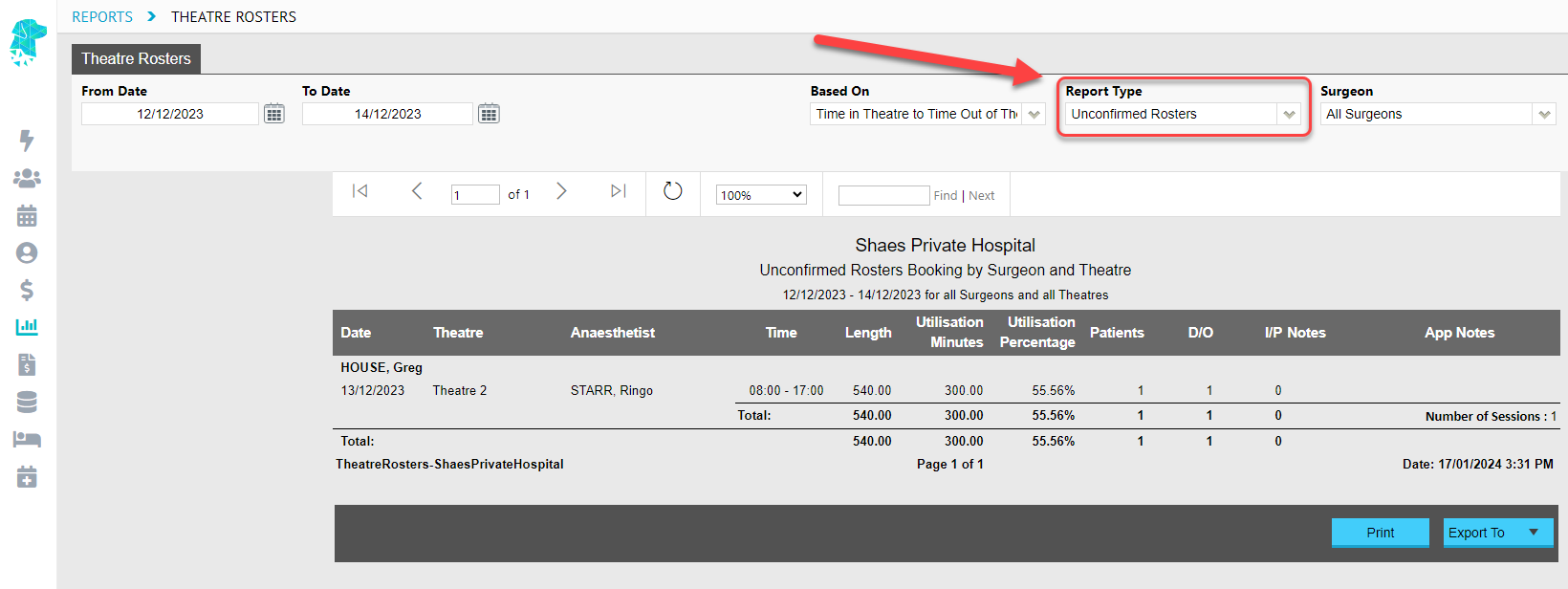
We’ve added a new Report Type to the Theatre Rosters Report called Unconfirmed Rosters. This allows facilities to easily identify rosters that haven’t yet had the Session Confirmed tick box completed in the specific Theatre Roster.
We have also added additional fields to enhance the usability of the Excel – Raw Data Export for the Theatre Roster Report including:
Booked Utilisation Percentage
Actual Utilisation Percentage
Delayed Start Reason and ID
Delayed Finish Reason and ID
Cancelled Reason and ID
Confirmed Indicator
Length of Stay Report Additions
There has been an additional column added to the Length of Stay Excel – Raw Data Export to display the Length in Minutes for overnight patients.
The original Length column is still present and will continue to reflect the number of nights; however, the new additional column will transcribe the information into minutes to help facilities identify the exact length of stay for the admission.
Invoice Export Report Additions
The Invoice Export Report can now be run for All Hospital Locations and All Clinic Locations AT ONCE! This new feature allows multi-location facilities to easily collate invoice data across all their sites simultaneously.
Bug Fix
The issue that some users experienced when trying to search for customised Other Services codes has been resolved.
FYDO Hospital Update – 05/01/2024
Quick Form Enhancements!
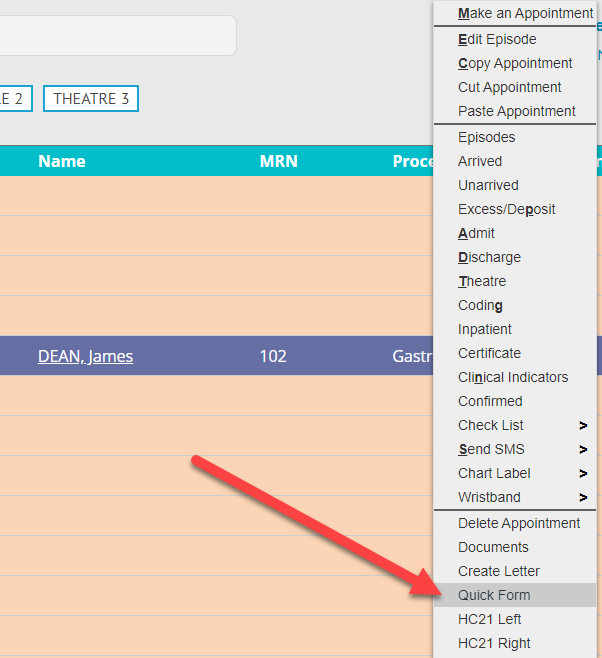
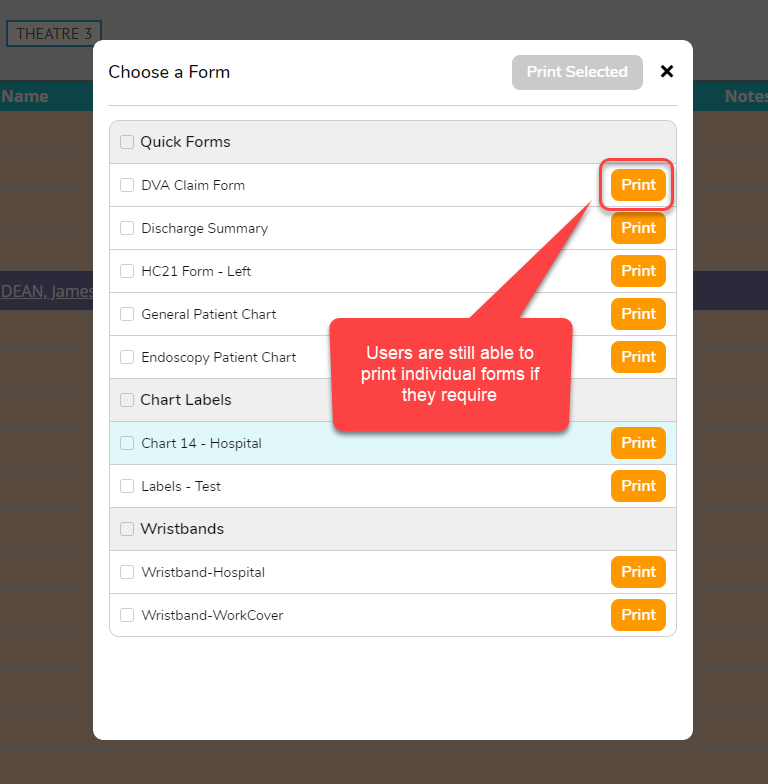
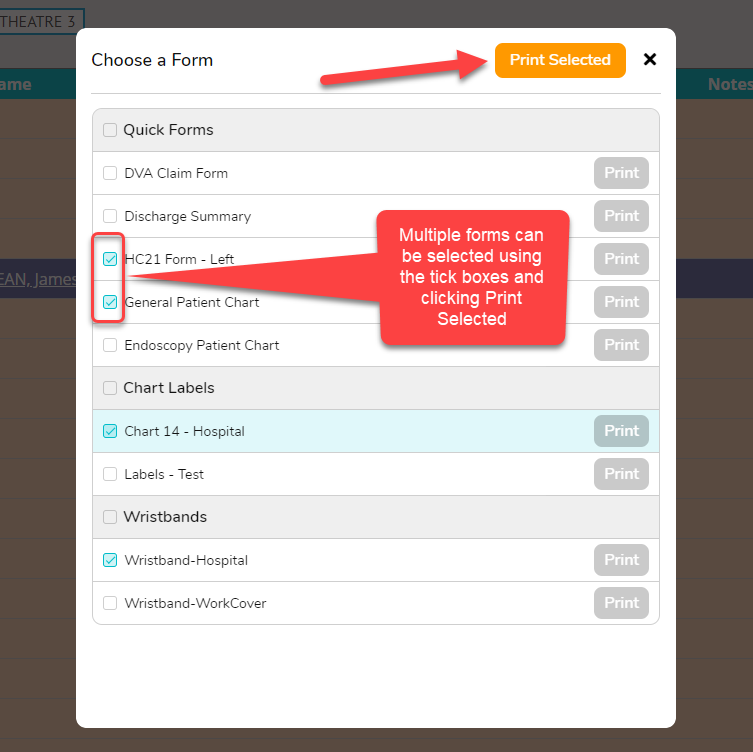
We’ve revamped the Quick Form feature for improved user workflow and efficiency. The new layout, accessible from the Right-Click Menu in Appointments, allows users to print multiple forms simultaneously. The updated Quick Forms pop-up now includes Labels and Wristbands, enabling users to print all required forms from ONE PLACE! Individual forms are still able to be printed by clicking the orange Print button. Selecting multiple forms activates the Print Selected button for a one-click, multi-form print experience!
DRG Fee Import Feature
Introducing the DRG Fees Import Feature! Now, users can import DRG Fees into FYDO using an Excel file. For step-by-step instructions, check out our new Wiki page: Hospital Health Fund Fees – Importing DRG Fees
Doctors Data – New Fields Available
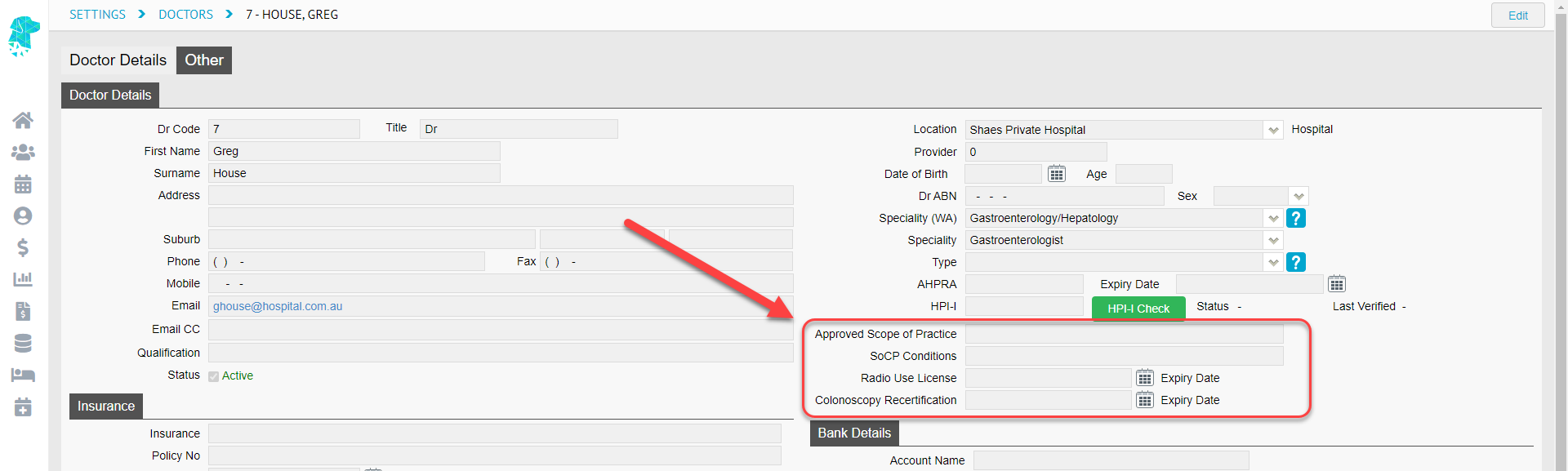
FYDO now has four additional fields available in Settings > Doctors to assist facilities efficiently manage and document credential information in FYDO. These fields include:
Approved Scope of Practice
SoCP Conditions
Radio Use License
Colonoscopy Recertification
Episode Stats Report Additions
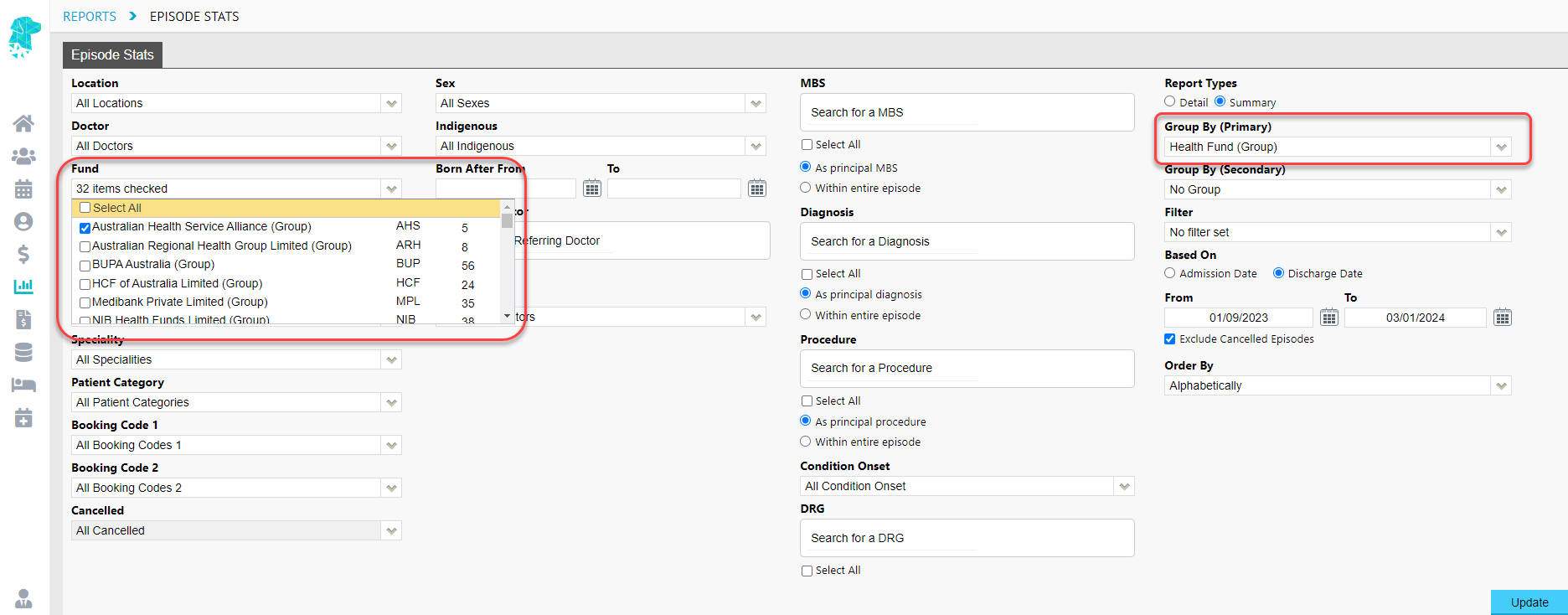
Users can now filter the Episode StatsReport by Health Fund Groups! Easily collect and organise data for multiple funds, under a specific group, at once (e.g. AHSA, ARHG etc). The new Group By (Primary) option, Health Fund (Group), also enables sorting data by Health Fund Groups.
The Medicare Eligibility has now been added to the Episode Stats > Export to Excel – Raw Data.
Length of Stay Report Enhancements
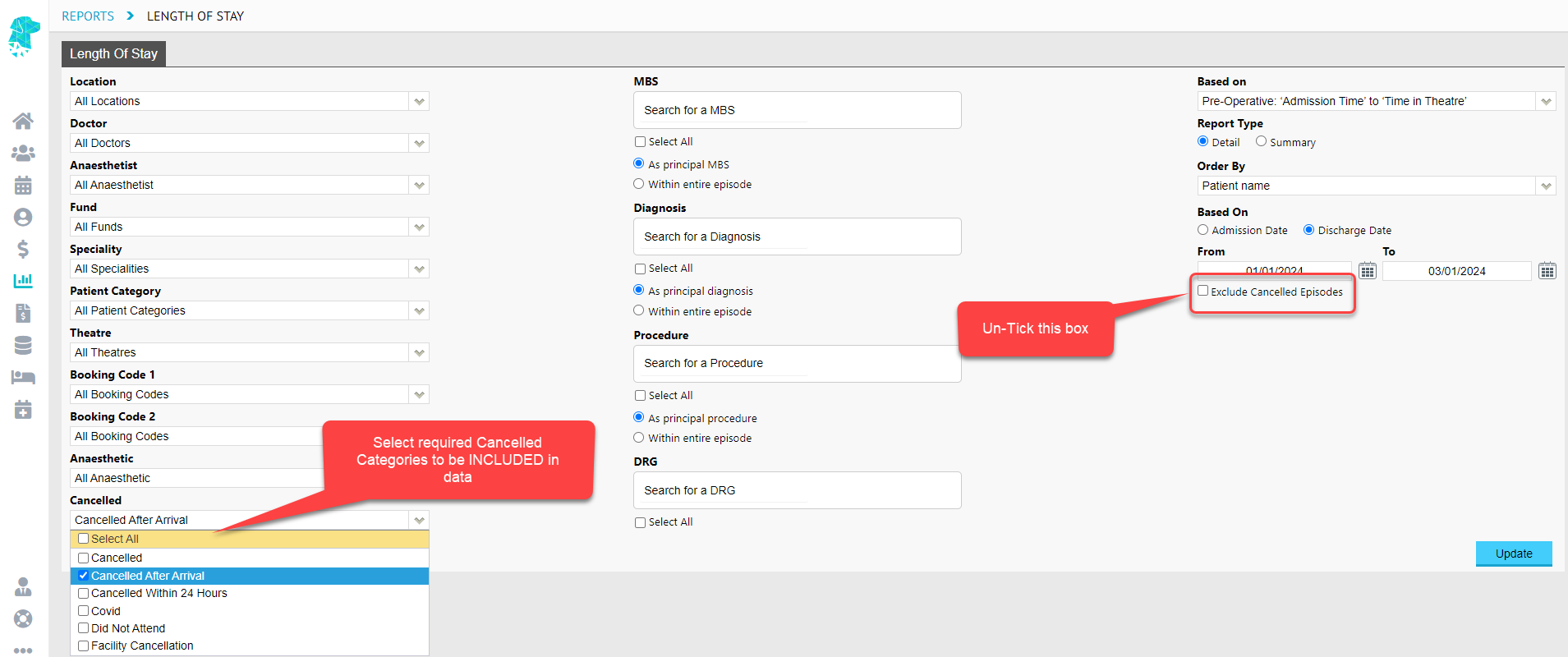
The Length of Stay Report now supports the inclusion of cancelled episodes. By default, it will Exclude Cancelled Episodes, but facilities can now easily include them (if they are admitted and discharged) by un-ticking the Exclude Cancelled Episodes box. Once un-ticked, the Cancelled filter becomes available, allowing for episodes that fall under specific cancelled reasons to be added to the collated data. For instance, to obtain information on all completed episodes AND episodes Cancelled After Arrival, select the options provided in the screenshot below.
New IP Restriction Function
Facilities can now use the new Global Restrict IP function in Settings > Security to simultaneously restrict all users to a specific IP address. While the ability to restrict individual users is still available in Settings > Users, this new feature streamlines the process for applying IP Restrictions across the board. Only users with the required access levels will be able to make amendments to these settings.
Third Party Statements
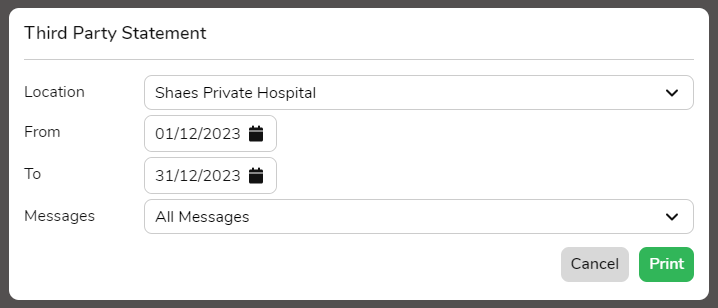
FYDO now enables users to generate statements for Third-Party companies by navigating to Settings > Third Parties and right-clicking on the required line.
A pop-up is displayed, allowing users to select the required dates before clicking Print to generate the statement.
FYDO Hospital Update – 14/12/2023
Theatre Screen – New Save Feature
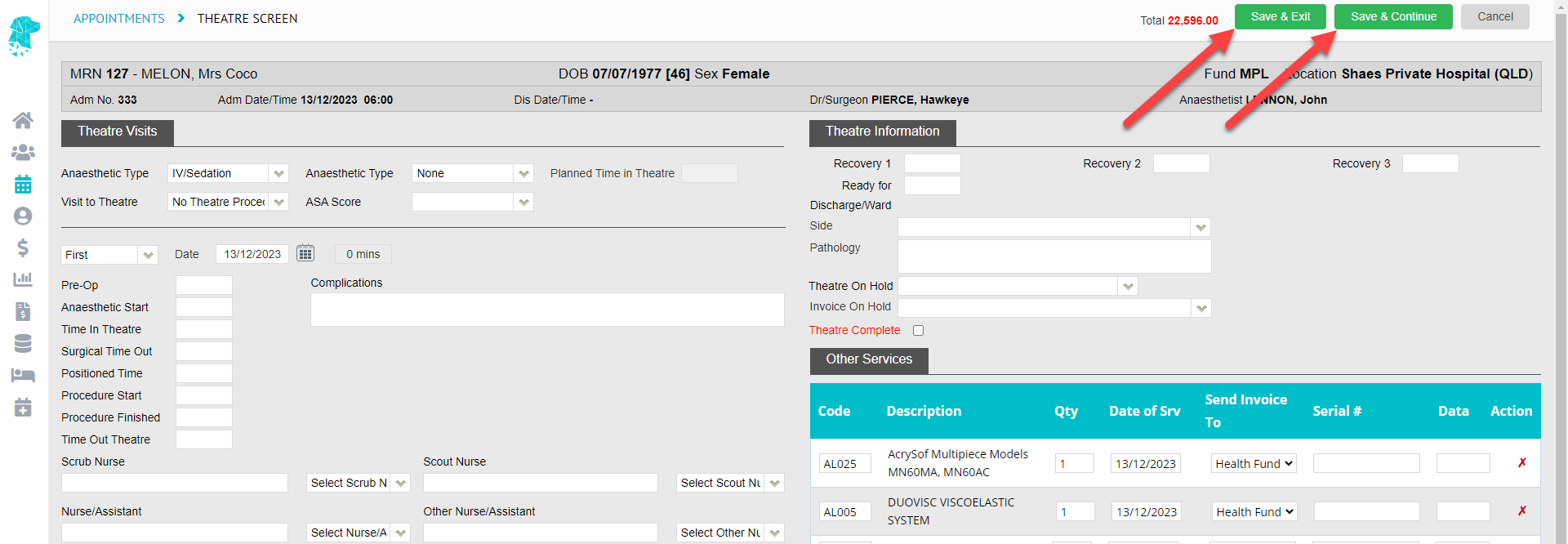
We are excited to introduce a new feature on the Theatre Screen that allows users to seamlessly add, and save, information without closing the screen. The new Save & Continue button is particularly beneficial for facilities that need to input data during procedures, enabling real-time updates without the need to repeatedly reopen the screen.
The existing functionality of the Save button will remain unchanged and will now be called Save & Exit.
Unbilled Revenue Report Additions
Theatre ID and Theatre Name have been added to the Unbilled Revenue Report > Excel – Raw Data Export.
Bug Fix – Invoice On Hold Feature
The issue that some users were experiencing with the Invoice On Hold feature not functioning correctly has now been resolved.
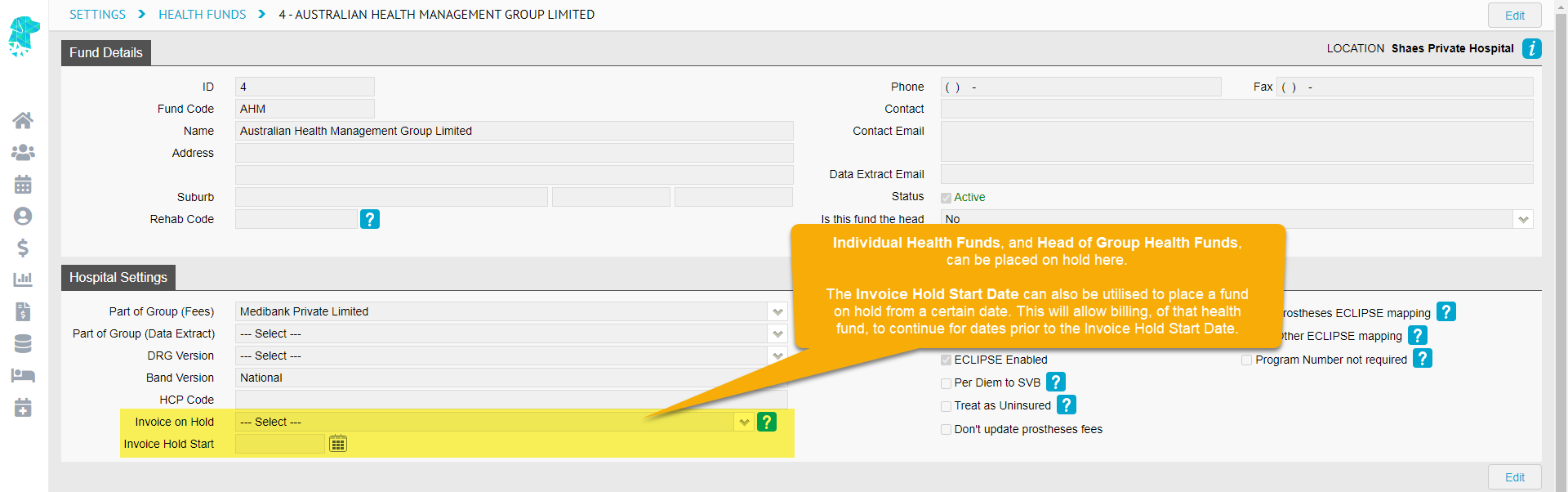
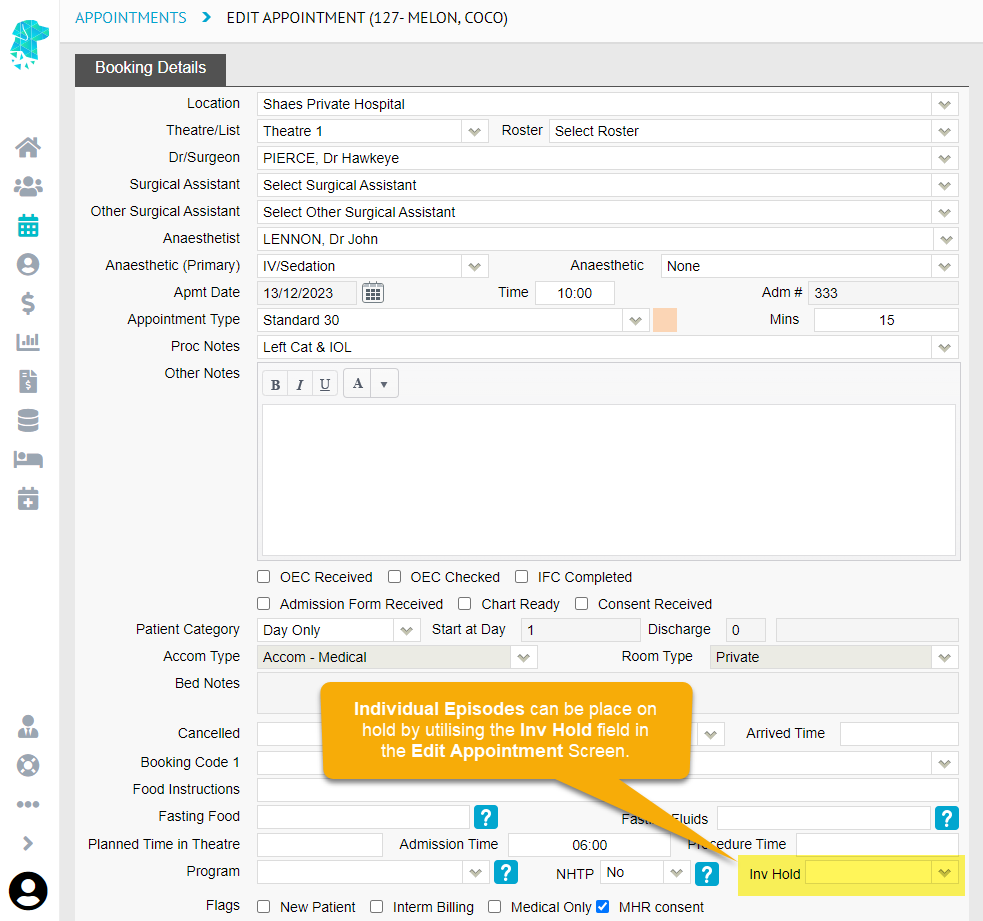
This feature gives facilities the ability to:
Place an Individual Health Fund on hold (Settings > Health Funds)
Place a Head of Group Health Fund on hold (Settings > Health Funds)
Place an Individual Episode on hold (Edit Appointment)
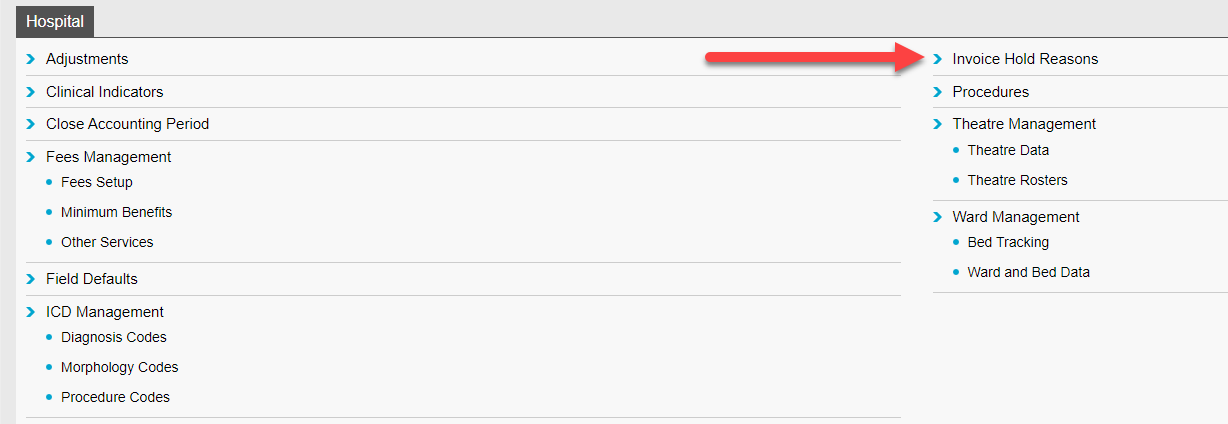
Each facility has the flexibility to customise Invoice Hold Reasons to accommodate their specific requirements for placing invoices on hold. This can be done, by a user with the required access levels, by navigating to Settings > Hospital > Invoice Hold Reason.
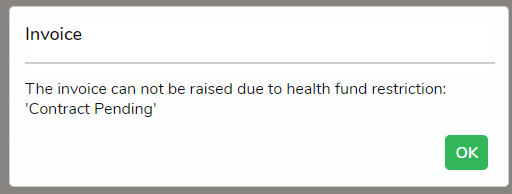
For Individual Health Funds and Head of Group Funds that are placed on hold, users will receive the below alert if they attempt to bill an episode that is linked to an on-hold health fund. However, there will be no visual cue in each individual appointment, as this field is intended to be used for placing only that specific episode on hold (e.g. Awaiting Pathology). This distinction ensures facilities can differentiate between a health fund being on hold and an individual episode being on hold, allowing them to utilise both features simultaneously if the need ever arises.
FYDO Clinic Update – 07/12/23
Accounts (Clinic) Permissions
Clinic Accounts permissions have been moved from the Patient section within user groups to its own section called Accounts (Clinic).
Apply Payments and Apply Adjustments have also been split into 2 separate permissions. Previously, they were together as a permission.
Security Settings Relocation
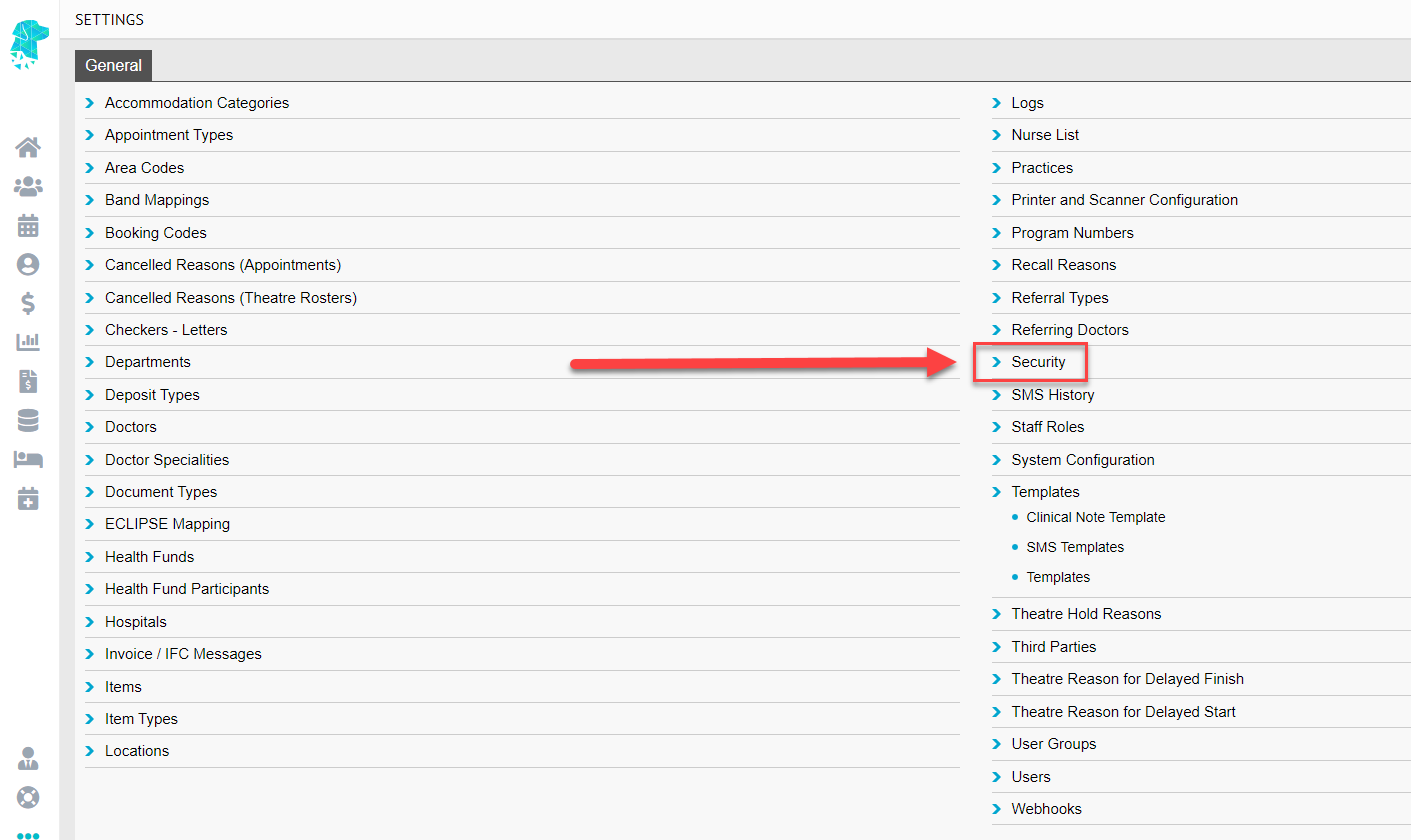
The Security Settings, originally located in System Configuration, can now be accessed directly from Settings. This change is designed to provide more control over user access to this section of FYDO.
These Security Settings include:
– Webhooks
– API Key
– 2 Factor Authentication Settings
– Single Sign On Settings
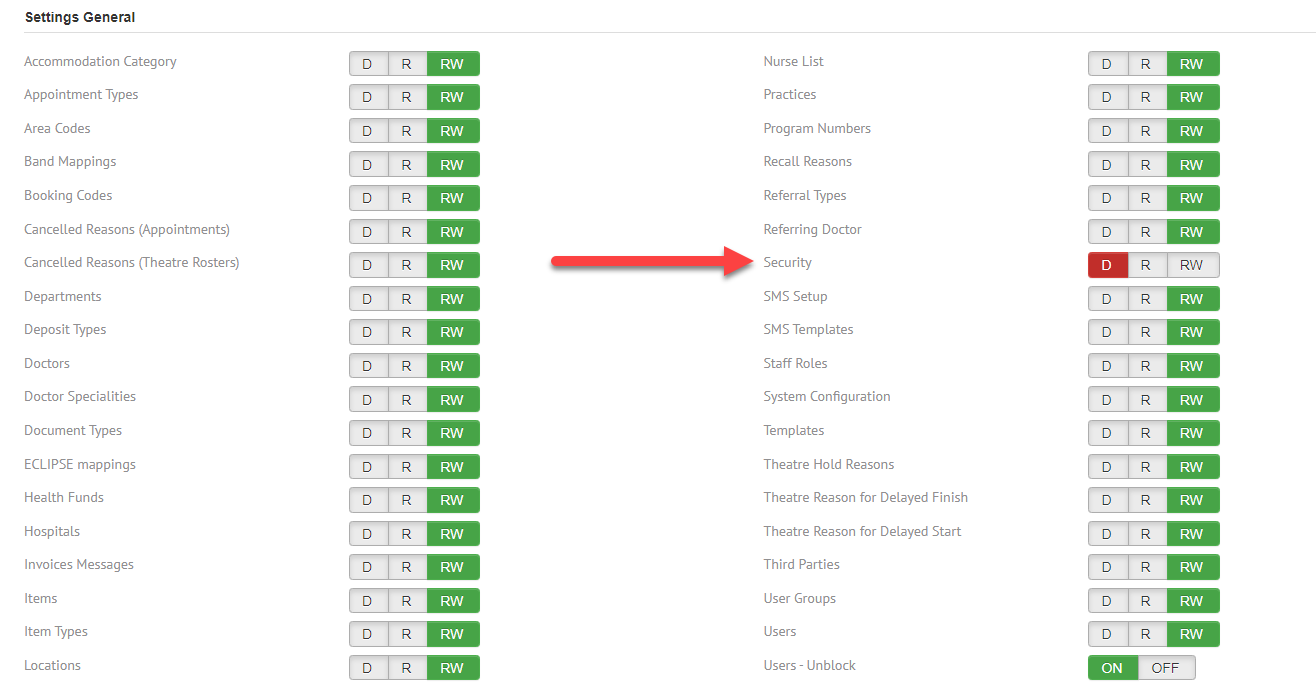
A new permission control has been added to Settings > User Groups. This change helps clinics grant specific users access to System Configuration without necessarily providing access to Security.
The new permission control will be defaulted to ‘D – Deny’ for all users except the Subscriber, who can adjust this setting for the required user groups.
Items Report
Additional fields have been added to the Items Report when exported in raw data format.
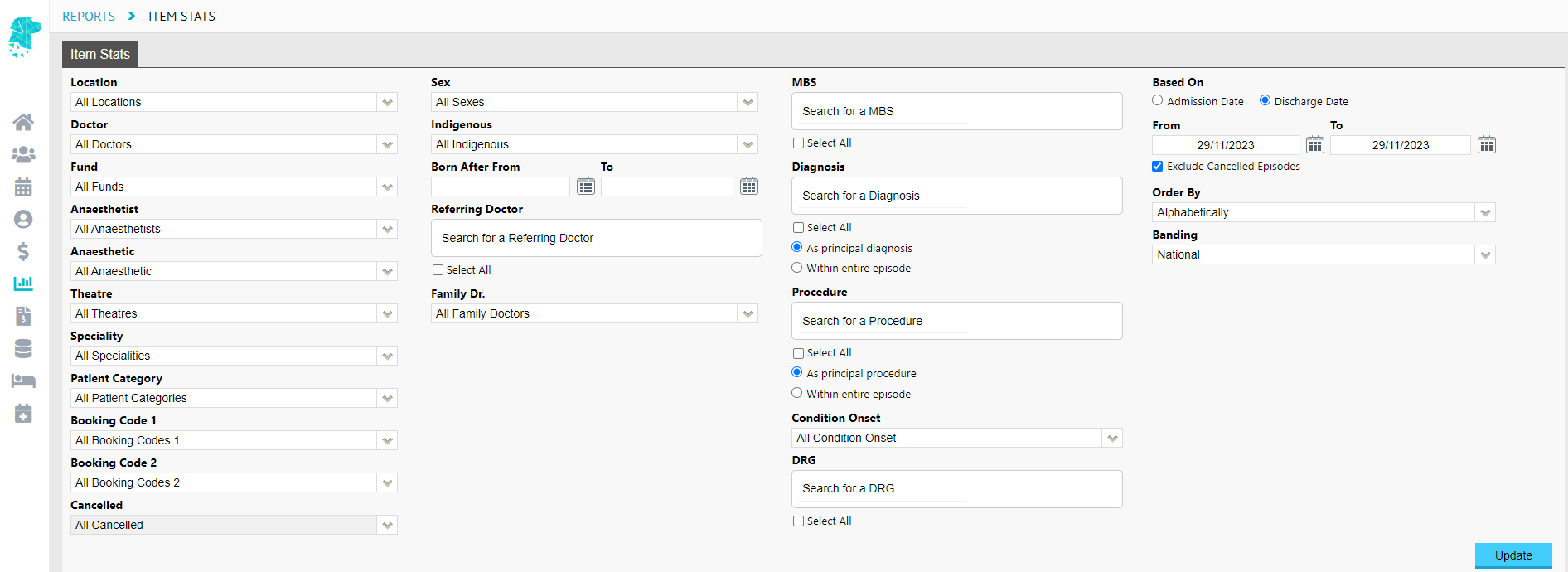
A new Item Stats Report has been added to FYDO that allows users to obtain statistics on all items listed in the Theatre Screen.
This will allow users to collate data easily and efficiently on numbers of procedures performed, whether they are primary or subsequent procedures.
Revenue Report Additions
Additional fields have been added to the Excel – Raw Data Export of the Revenue Report. These fields include:
Theatre ID
Theatre Name
Time In Theatre (First theatre visit)
Time Out Theatre (First theatre visit)
Minutes in Theatre (First theatre visit)
Security Settings Relocation
The Security Settings, originally located in System Configuration, can now be accessed directly from Settings. This change is designed to provide more control over user access to this section of FYDO.
These Security Settings include:
– Webhooks
– API Key
– 2 Factor Authentication Settings
– Single Sign On Settings
A new permission control has been added to Settings > User Groups. This change helps facilities grant specific users access to System Configuration without necessarily providing access to Security.
The new permission control will be defaulted to ‘D – Deny’ for all users except the Subscriber, who can adjust this setting for the required user groups.
Adding Multiple Label Templates
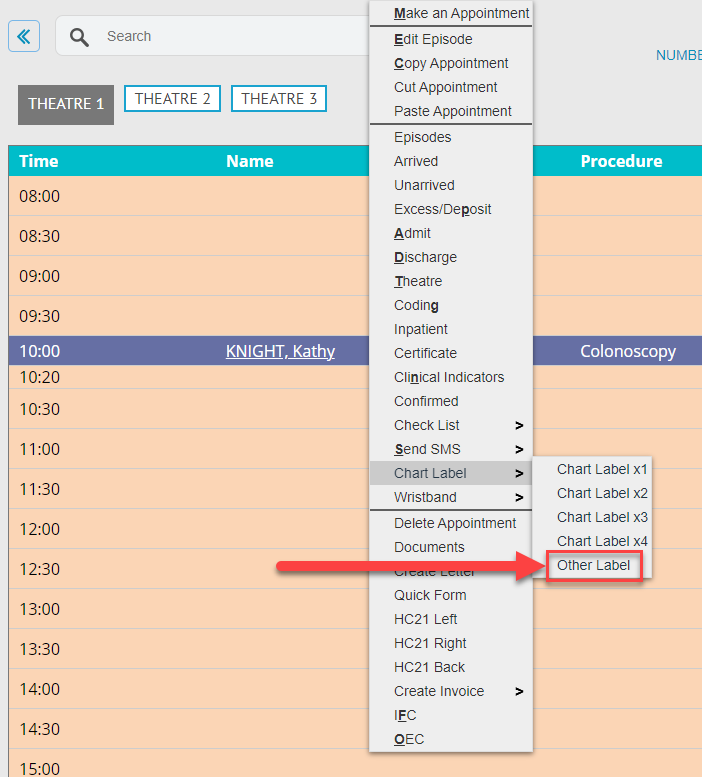
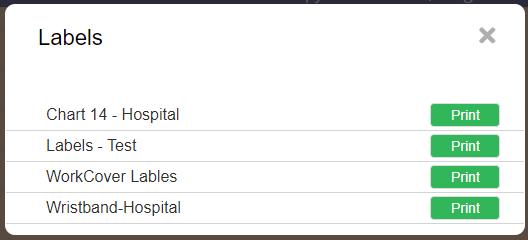
FYDO now supports multiple label templates. Users can choose from various label templates, loaded into their database, by utilising the Other Label option under Chart Label. The Default chart label template will still print when any of the original options (Chart Label x1, Chart Label x2 etc) are selected.
When selecting the Other Label option, a pop-up will display a list of available Chart Label Templates.
Bug Fixes
The original default Print List > Order of List (Theatre, Booking Time, Doctor, Anaesthetist) has been reinstated.
The speed issue some sites were experiencing while running the Arrears Report has been improved.
The problem some users encountered with updating the doctor from the Theatre Roster Screen, which was not feeding into DOX, has now been resolved.