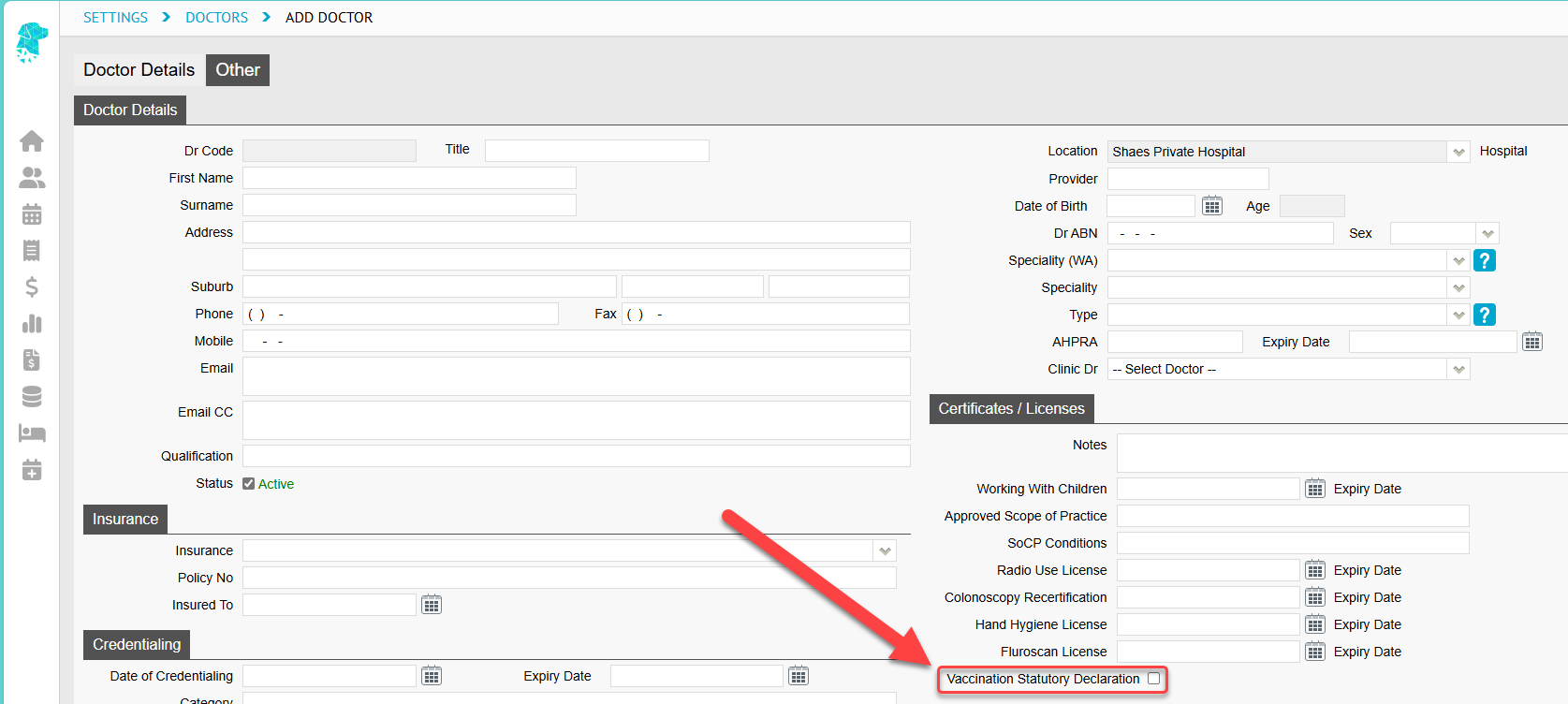
A new checkbox option has been added under the Doctor section in Settings to indicate whether the doctor has signed their Vaccination Statutory Declaration.
This information has also been added to the Doctors List > Excel Export.
Patient Alerts Screen Improvements
The Patient Alerts screen will now display over additional pages if there are more than 50 entries to show. This enhancement will improve loading performance and allow users to click between pages.
FYDO Hospital Update – 29/05/2025
Doctors Credentialing Alerts
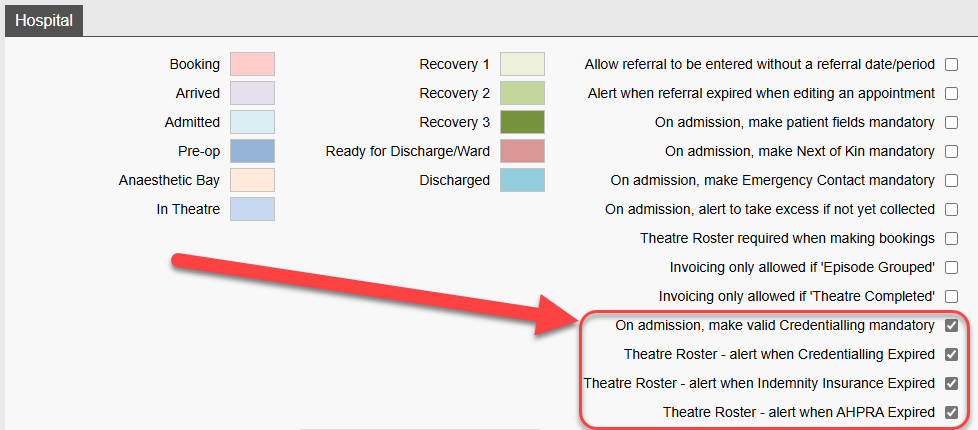
FYDO’s latest feature introduces alerts related to doctor credentialing. Under Settings > System Configuration > Hospital, four new tick box options are now available:
On Admission – Make valid credentialing mandatory
Theatre Roster – Alert when credentialing has expired
Theatre Roster – Alert when indemnity insurance has expired
Theatre Roster – Alert when AHPRA registration has expired
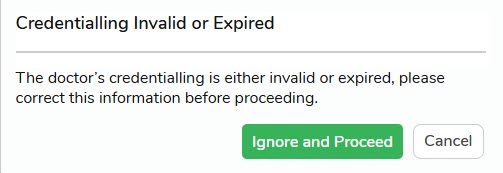
If your facility utilises these new tick boxes, a pop-up message will appear indicating which specific requirement needs attention whether during patient admission or when creating a theatre booking.
Pre-Admit Holding Bay
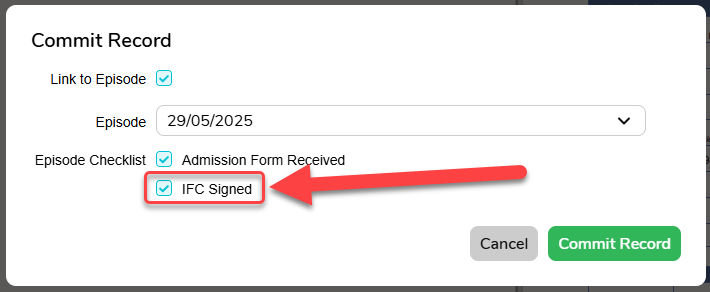
In the Pre-Admit holding bay, a new option is now available when committing a patient: you can select ‘IFC Signed’ if you are linking the form to a particular episode and the patient has digitally signed the Informed Financial Consent (IFC). Once selected, this will be reflected in the checklist on the admission screen.
Tokens
FYDO now has a token for the Signed Informed Financial Consent (IFC) Checklist Item. This token will work on:
Theatre List
Quick Forms
SMS
Handover Report
Bed Tracker
Please see below to view the newly added token:
For a full list of available IFC tokens, click the link below to access our FYDO Wiki Manual:
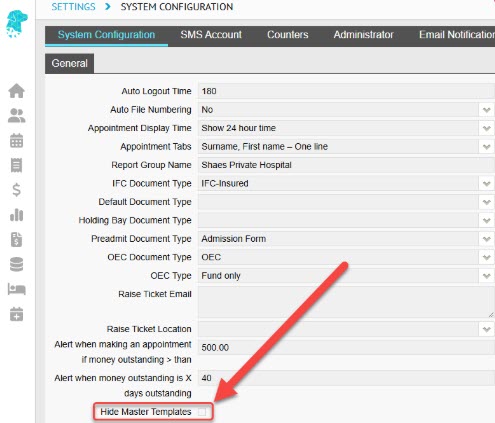
FYDO now allows hospitals to “hide” the Master Templates so that they are not an option for users to select accidentally.
This setting can be amended by a user from your hospital that has access to Settings > System Configuration by ticking the Hide Master Templates checkbox. Once this is selected the master templates will not be displayed in any of the dropdowns where users are able to select from available template option, for example when creating an IFC or Invoice.
Tokens
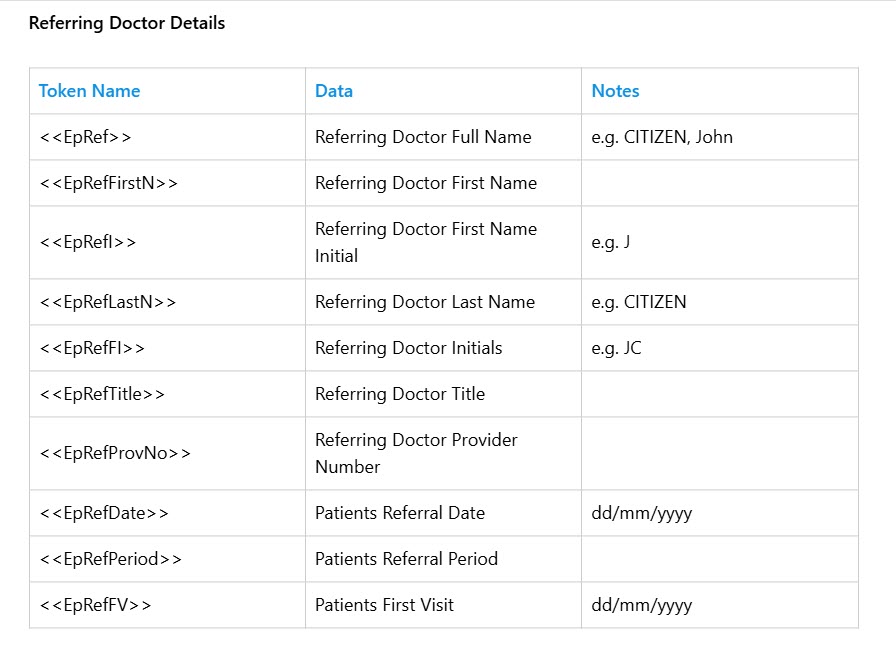
FYDO now has tokens for the Referring Doctor details listed on the Edit Appointment Screen. These tokens will work on:
Theatre List
Bed Tracker
Quick Forms
SMS
Template Type (Hospital Invoice)
Please see below for a list of the newly added tokens:
For a full list of available hospital tokens, click the link below to access our FYDO Wiki Manual:
FYDO now enables access to certificates from the Claiming Hospital > Claims & Not Yet Sent tabs. This feature will prove valuable in the event of rejections, allowing you to quickly verify whether a certificate has been applied to a specific episode. Simply right-click to view the available options, which will now include Certificate.
FYDO Hospital Update – 15/05/2025
Revenue Report
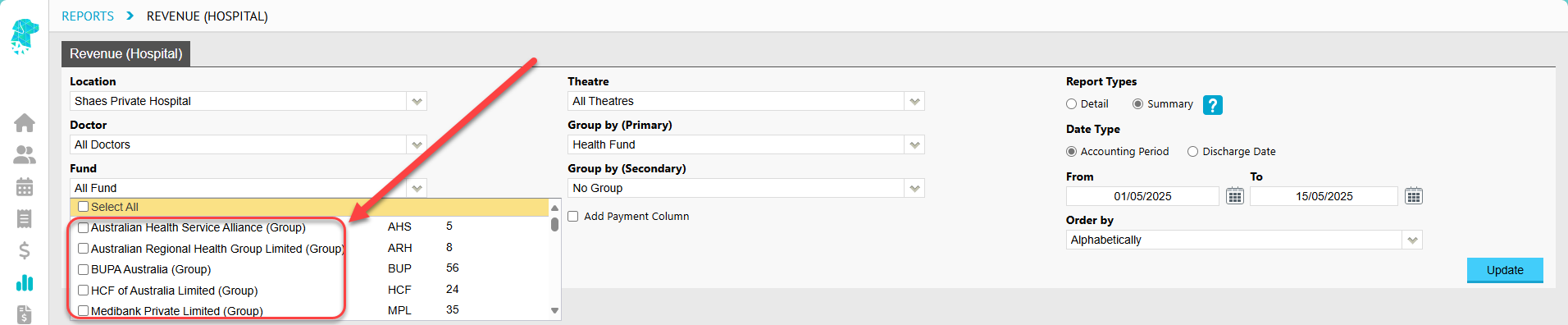
The option to filter by Health Fund Groups has been added to the Revenue Report. This feature functions in the same way that it does in the Episode Stats Report, requiring a single location to be selected. For single-location databases, this will occur by default. For multi-location databases, the location will need to be selected manually.
IFC Checklist Item
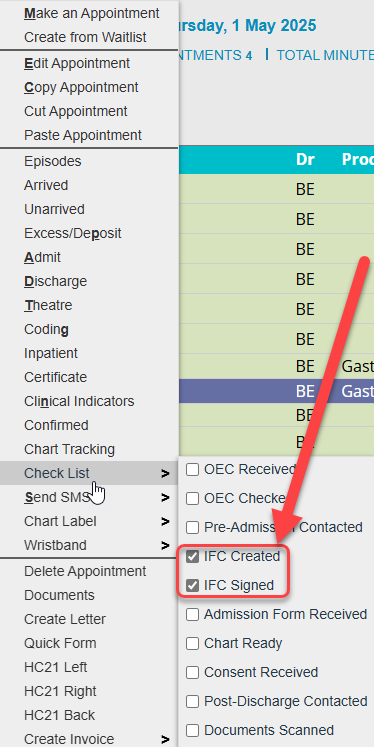
The original “IFC Complete” option on the Patient Appointment Checklist has been updated to give facilities more flexibility in tracking progress through the admission process. The new IFC options are:
IFC Created – tick this when the IFC has been generated
IFC Signed – tick this once the patient has signed their IFC
Audit logs have been added to track when these boxes are ticked and unticked. The new IFC options have also been included in the Episode Stats > Raw Data Export Report and are available to add to a Custom View.
This update also lays the groundwork for exciting upcoming features – including the ability for the “IFC Signed” box to be automatically ticked when a patient electronically signs their IFC. So…. Watch this space!
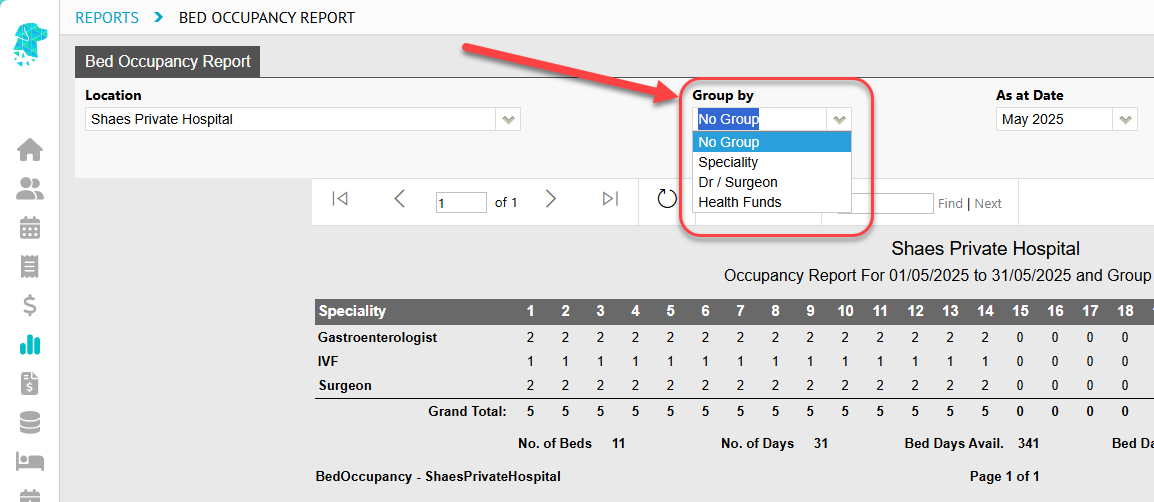
Bed Occupancy Report
A new filter has been added to the Bed Occupancy Report that allows for the data to be displayed in additional useful formats. The options in the Group By drop down are:
No Group – Report will run as it has historically run
Speciality – Information will be grouped by admitting doctors Speciality
Dr/ Surgeon – Information will be grouped by the admitting Doctor / Surgeon
Health Fund – Information will be grouped by the patients Episodic Health Fund
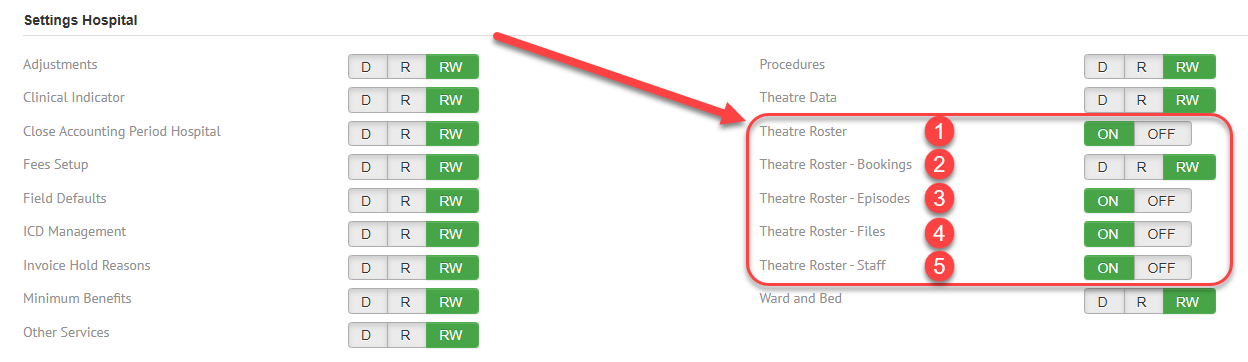
Theatre Roster Access Levels
Improvements have been made to the Theatre Roster access levels to ensure all staff have appropriate access to the functions required for their daily tasks.
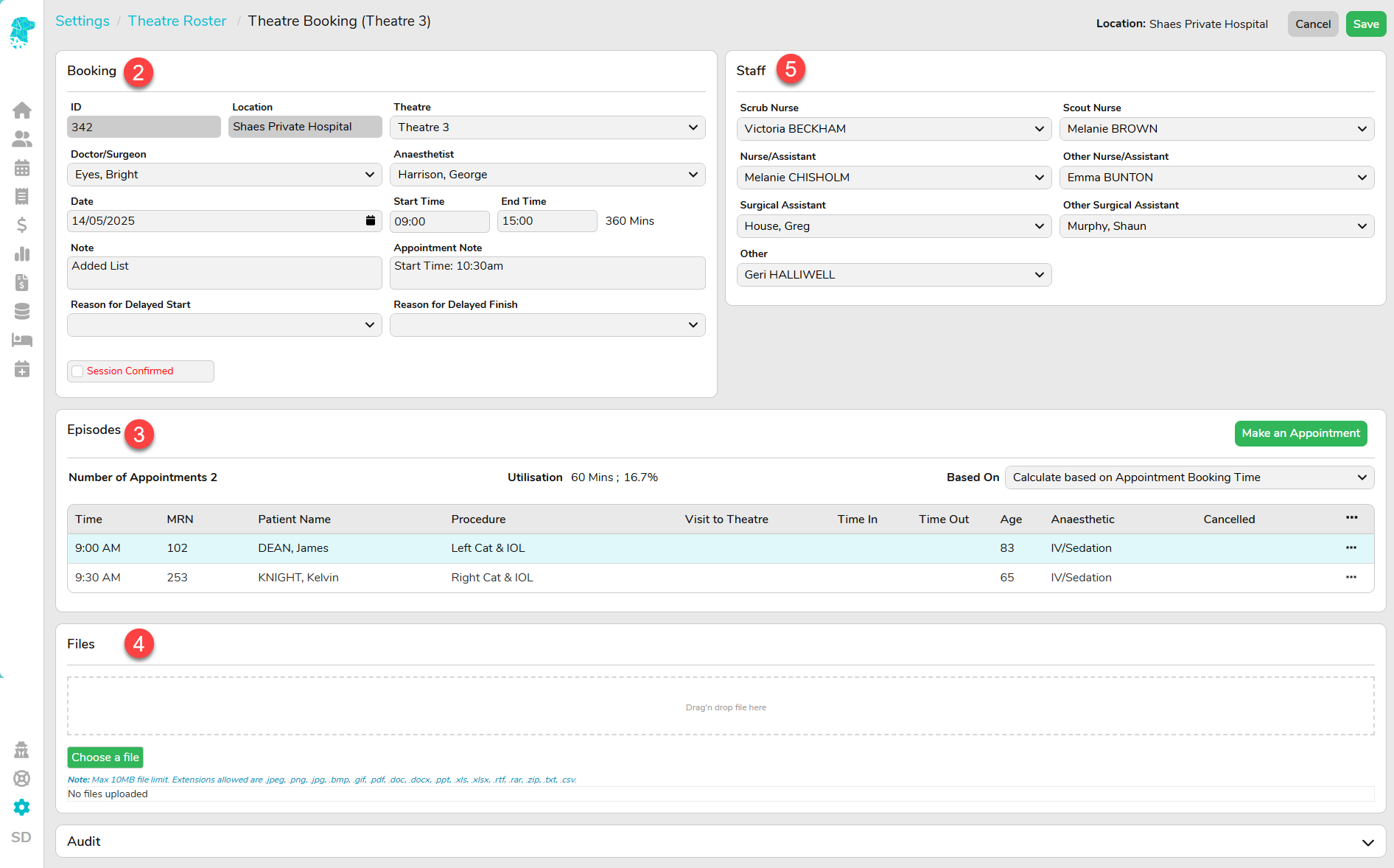
These updated settings allow staff to be granted access to specific components of the Theatre Roster, including:
Theatre Roster – Allows the user to view the Theatre Roster Screen only.
Theatre Roster Bookings – Controls access to the theatre booking functionality: – RW (Read & Write) – View, and edit theatre bookings – R (Read) – View theatre bookings only – D (Deny) – No access to view theatre bookings
Theatre Roster Episodes – Allows the user to amend the Episodes section within a Theatre Booking.
Theatre Roster Files – Allows the user to add, edit and remove Files associated with the Theatre Booking.
Theatre Roster Staff – Allows the user to enter and amend the Staff assigned to the Theatre Booking.
South Australia Cancer Registry Data Extract
Following the addition of the South Australian Cancer Registry screen during our FYDO Hospital Update on 27/03/2025 (FYDO Hospital Update – 27/03/2025 – FYDO Wiki) the ability to extract this data has been implemented.
South Australian hospitals can now utilise the SA Cancer Registry option to extract this information in the same manner as any other data type.
FYDO Hospital Update – 09/05/2025
Patient Alerts Flag
The Patient Alerts Flags, generated from Preadmit, can now be added to Custom Views on the Appointment Screen. This feature allows staff to easily see items that have triggered alerts while patients complete their online admission forms. Once added to a Custom View, simply hover over the icon to view the alert details.
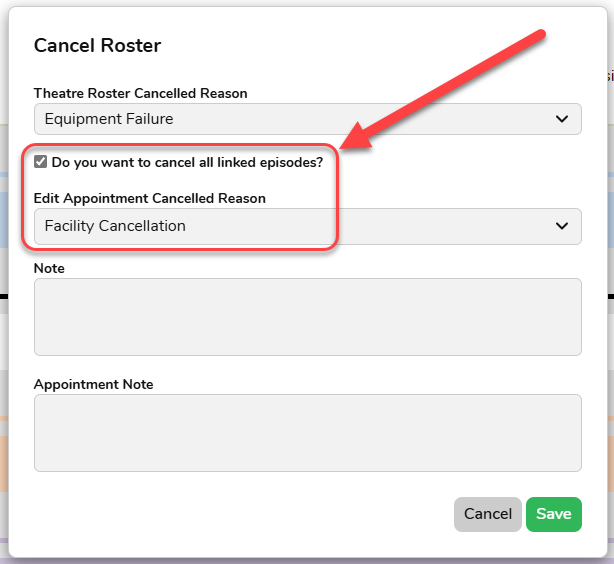
Cancelling Theatre Bookings
Facilities can now Cancel entire Theatre Bookings in one action using a new feature that allows all episodes linked to a specific Theatre Booking to be cancelled simultaneously. Users can select a Cancellation Reason from the drop down, which will be applied to all linked Episodes. This is a time-saving feature where an entire doctor’s list needs to be cancelled. This feature also works in reverse, allowing entire lists to be reinstated if needed.
Arrears Report API
A new API is available to obtain information from the FYDO Arrears Report.
FYDO Hospital Update – 01/05/2025
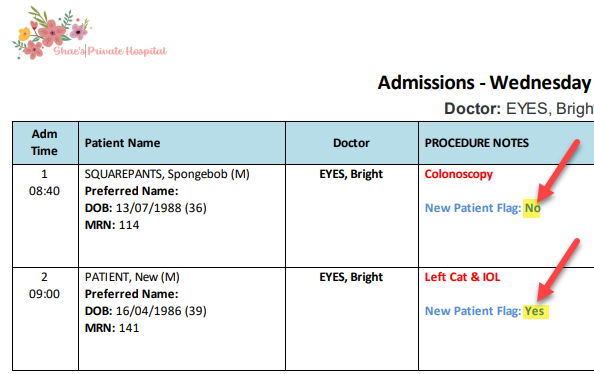
New Patient Flag
Following the addition of the New Patient Flag(as noted in our 11.4.25 newsletter) the field now has a corresponding token that can be used in forms, lists, SMSs, and more. This token is <<EpNP>> and it will display as Yes for new patients or No for patients that have had a previous episode.
Theatre Roster
It’s now even easier to identify which Theatre Bookings have Files loaded, with a new icon visible in Day, Week and Month views to indication how many files are linked to each booking.
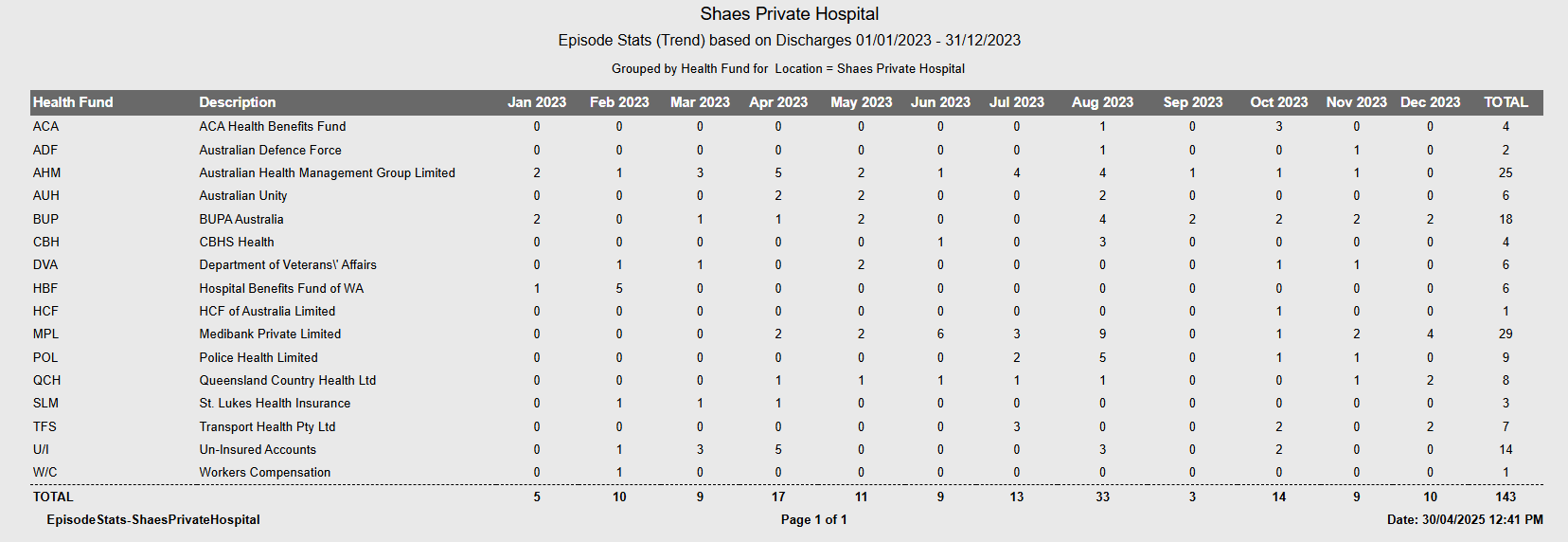
Episode Stats Report
A new option has been added to the Episode Stats Report that allows facilities to easily identify Trends. The report can now be run by Week, Month or Year, making it simpler to obtain figures over extended periods. With the same Group By and filter options still available, this enhancement significantly improves the usability of the Episode Stats Report – allowing facilities to collate monthly stats by doctor, health fund, MBS and much more!
New Dashboard
The launch of the long-awaited FYDO Dashboard is finally here! It displays helpful information including FYDO Updates, Feature Spotlights, tips and more – all in one convenient place. And this is just the beginning! We have plans to continue expanding and refining the dashboard to give you faster, easier access to information you need!
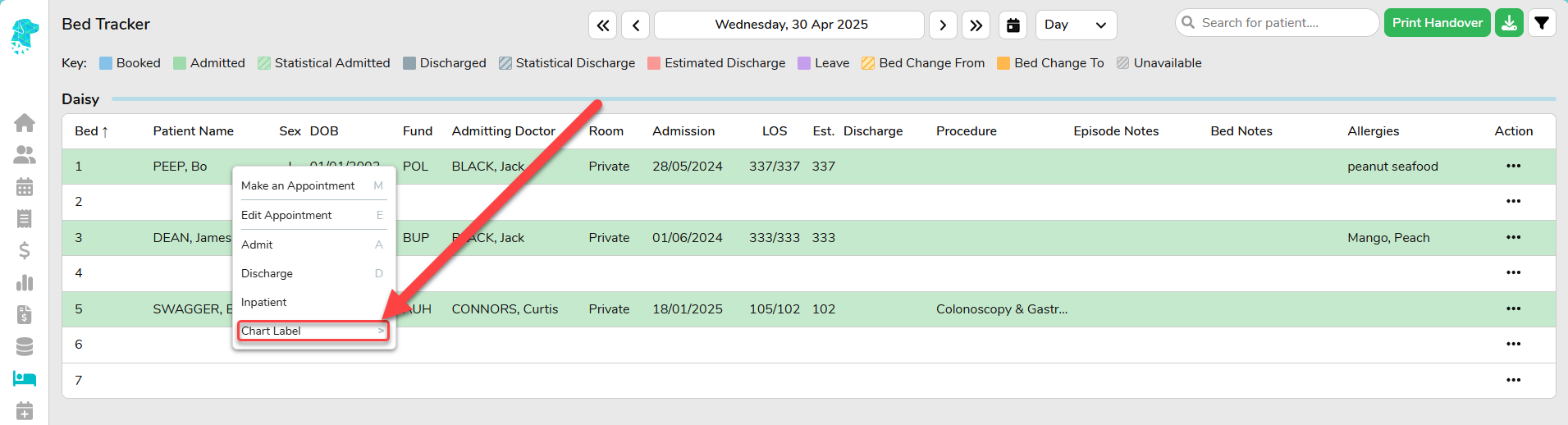
Bed Tracker
Chart Labels can now be printed from the Right-Click Menu in the Bed Tracker.
Tasmanian Cancer Registry Screen
Tasmanian facilities can now record Cancer Registry information in FYDO. This screen is accessible via the Coding Screen (in View mode) by clicking Cancer Registry.
This marks the first stage of this development, and facilities are able to commence adding cancer registry data, with the next stage enabling data extraction via Data Extracts. Keep an eye on upcoming newsletters for confirmation once this feature is complete.
Unbilled Revenue Report API
A new API is now available, allowing data from the Unbilled Revenue Report to be utilised externally.
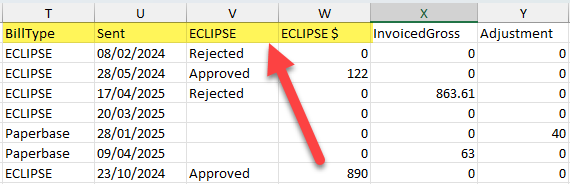
Revenue Report
Additional information has been added to the Revenue Report > Excel – Raw Data Export to help facilities easily access details regarding the sent status and ECLIPSE responses from health funds. The following columns have been added: – BillType: Indicates whether the claim was sent via ECLIPSE or manually (Paperbase). – Sent: The date the claim was sent via ECLIPSE or marked as sent for Paperbase claims. – ECLIPSE: Displays the ECLIPSE assessment status, indicating whether the claim has been Approved or Rejected. – ECLIPSE$: Shows the amount the fund has indicated it will pay towards the episode.
FYDO Hospital Update – 24/04/2025
Theatre Rosters Report
Additional options have been added to the Theatre Rosters Report, providing greater flexibility in how doctors roster utilisation information can be viewed.
A new Speciality option has been added to the Report Type, along with an additional field that allows users to Group By either Surgeon or Theatre.
FYDO Clinic Update – 17/04/2025
Patient Screen – Further Re-Order Options
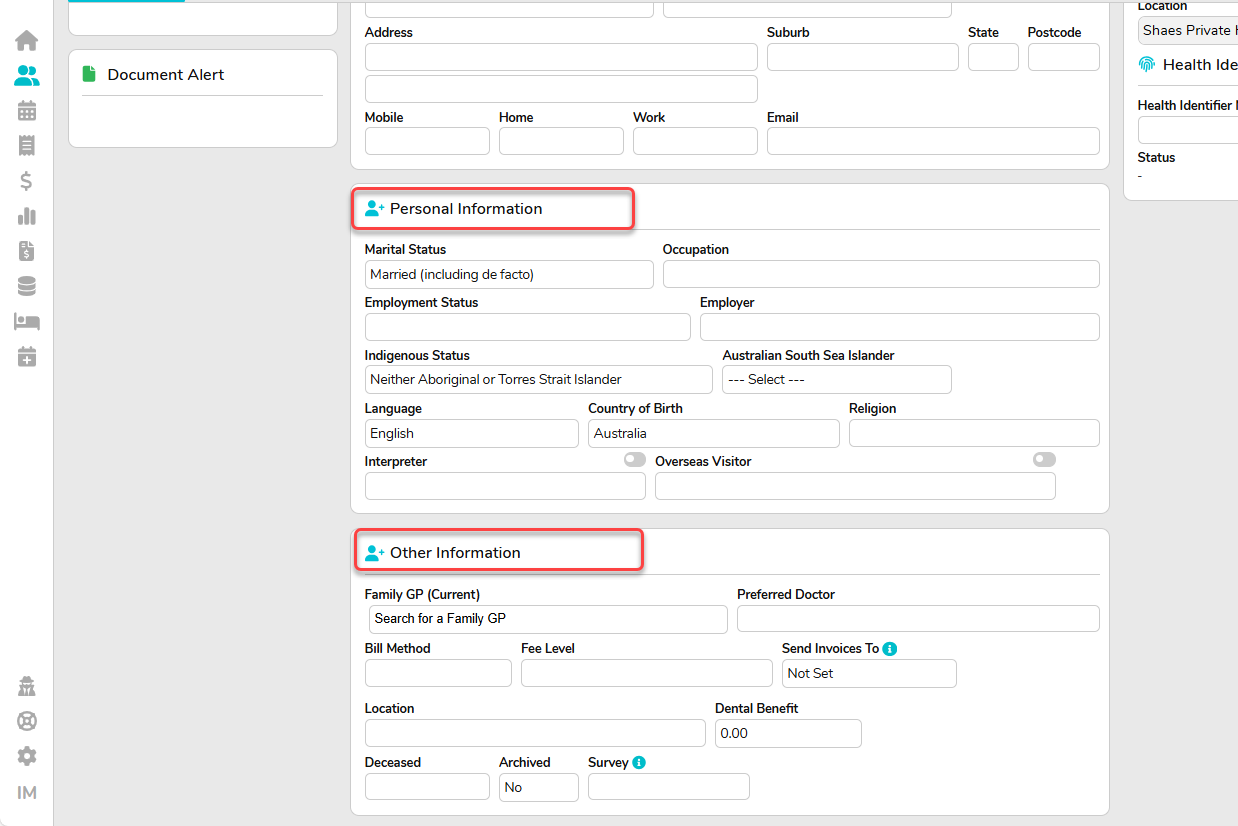
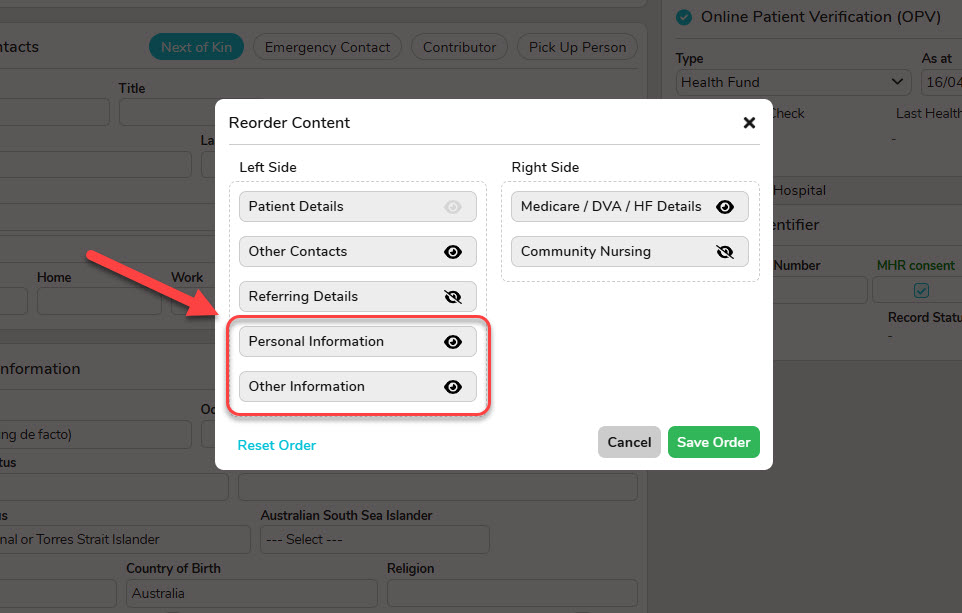
In the Patient Screen, the section originally known as “Other Information” has been split into two sections: “Personal Information” and “Other Information”. This update allows you to better tailor the screen to your needs using our Reorder Content feature.
In the Patient Screen, the section originally known as “Other Information” has been split into two sections: “Personal Information” and “Other Information”. This update allows you to better tailor the screen to your needs using our Reorder Content feature.
Episode Stats Report Addition
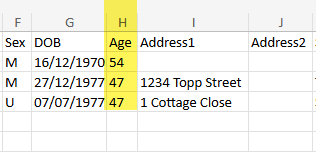
Patients Age at the date of their admission has now been added to the Episode Stats > Excel – Raw Data Export Report.
Revenue Report Addition
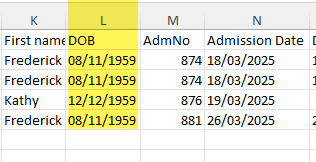
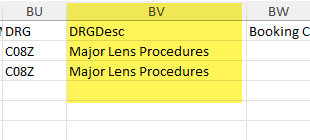
Date of Birth from the Patient Screen and DRG Description from the Coding Screen has now been added to the Revenue > Excel – Raw Data Export Report.
FYDO Clinic Update – 11/04/2025
Improvement to the Pension/Concession Card Alert
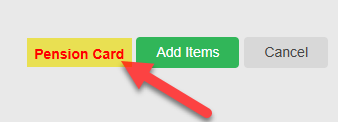
We’ve improved this feature to now apply across all bill types. The Clinical Billing screen has been enhanced to display a helpful alert when billing a patient that holds a Pension/Concession Card. FYDO will now show an alert next to the Add Items button. This aims to assist users in improving accuracy when choosing a fee level and entering MBS item numbers.