FYDO Hospital Update – 09/01/2026
Theatre Roster Setup Improvements
FYDO has introduced four configurable blocks within the theatre roster setup. For example, on every second Wednesday, a theatre may operate from 7:00 am to 11:00 pm, while on standard days it operates from 7:00 am to 4:00 pm. This enhancement provides increased flexibility in defining theatre operating hours and allows theatres to be closed on specific days of the month.
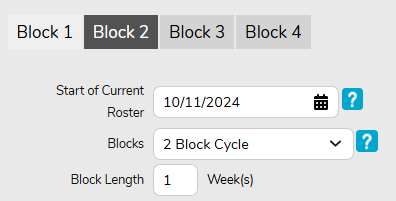
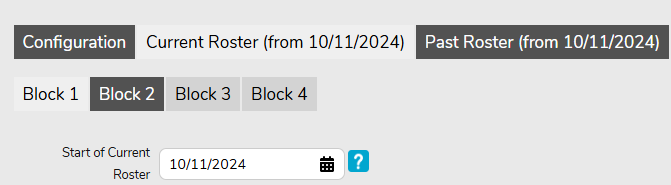
FYDO now includes separate Current and Past Roster tabs. For example, Theatre 4 may have operated Monday to Friday last year, but now operates only Monday to Thursday. Users can define the start date of the current roster, ensuring accurate tracking of both historical and current scheduling arrangements.
Emailing Invoices via FYDO
When sending invoices from the Episodes Screen, utilising the Invoice Options > Invoice Copy feature, the email will now be delivered using the users own email address. This feature will improve functionality and make it easier for facilities to view sent emails. Setup information and instructions on how to utilise this feature are available via the links below:
Appointment Screen Improvement
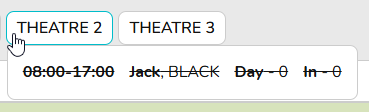
When hovering over a theatre to view the list of doctors scheduled for that theatre on the day, any cancelled list will now be clearly indicated with a strikethrough in the doctor list. This visual enhancement improves visibility and helps users quickly identify cancellations.
User Group Settings
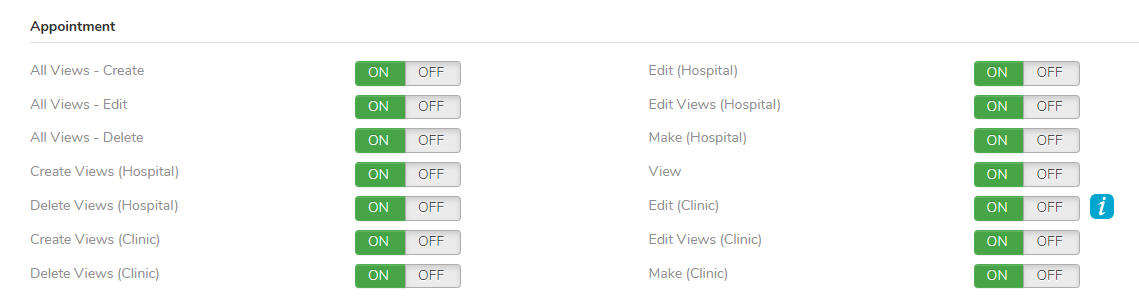
FYDO has expanded the options available under the Appointment heading. Previously, users were limited to a single option that allowed the creation and deletion of Custom Views only. This has now been enhanced to include the ability to create, edit, and delete all views. These additional options provide greater flexibility in managing views, allowing staff to create their own customised views, while also enabling administrators to control permissions and determine which staff members are authorised to modify all views which will affect all users.
New Hot Keys
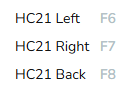
Hot keys have now been created for use in the Appointments Screen to print the Hospital Claim (HC21) Form, as per below. Please note that depending on your keyboard configuration, some users may need to utilise additional keys for their “F” features to function. For example, they may need to press fn + F6 to print the HC21 Left.
Theatre Roster Improvement
Previously, the Theatre Roster allowed users to bulk move an entire theatre list to a new date; however, this functionality was limited to only future dates, as moves to or from the current day were not supported. This capability has now been enhanced to allow theatre lists to be bulk moved to and from the current day, providing greater flexibility in schedule management.
Invoice Date Changes
When an invoice is reversed, the Date of Service was previously set to match the account period date. This behaviour has now been updated so that the Date of Service on the reversal will align with the Date of Service of the item being reversed. This change does not impact any revenue calculations and will only affect the Invoice Excel report.