FYDO Hospital Update – 10/09/2026
Theatre Roster – Monthly View Improvements
FYDO has made a number of improvements to the Monthly View to make it more user-friendly and easier to navigate, based on the information you need to see.
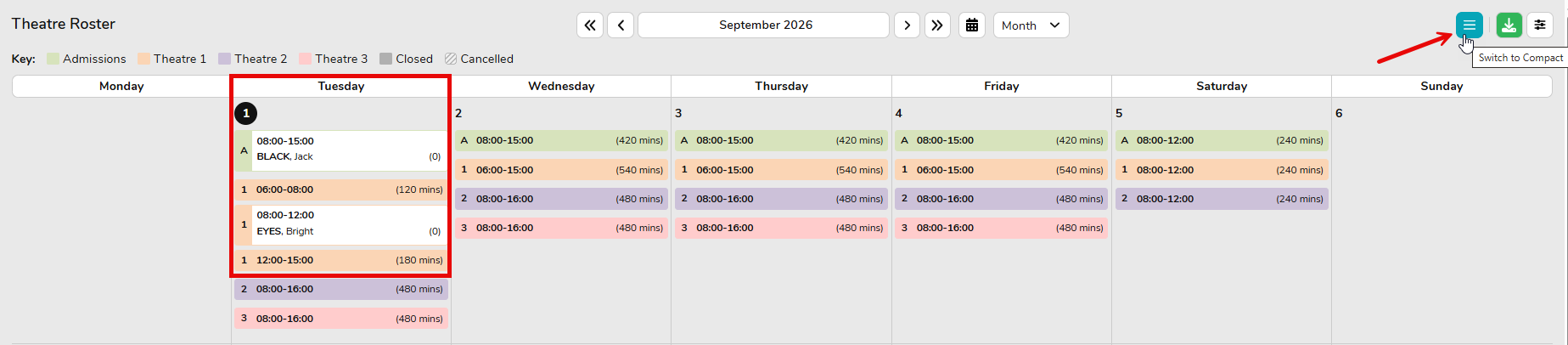
One of the biggest changes is that theatre numbers are now displayed directly on each session card. This removes the need to remember which colour corresponds to each theatre, making it quicker and easier to identify sessions at a glance.

We have also introduced Compact and Comfortable viewing options.
The Compact View condenses the information into a single line and hides additional details, allowing you to see more sessions on the screen at once.

The Comfortable View is the main viewing option and displays all available information, making it easier to see the full details of each session.
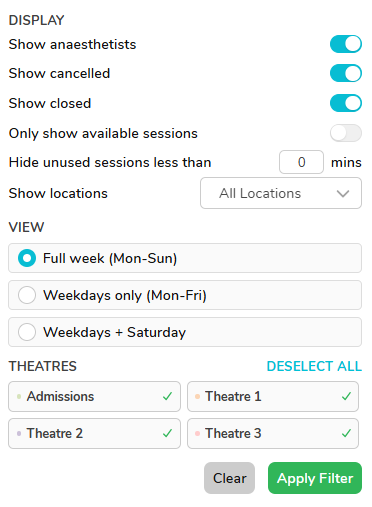
The Filter section has also been improved, with more options available to help you hide or display specific information in the Monthly View.
The Only Show Available Sessions option is particularly useful when booking a doctor in, as it allows you to view only the sessions that are currently available. You can also hide unused sessions by selecting Hide unused sessions less than (mins). For example, if a theatre is open from 6:00am to 6:00pm but the theatre list only runs from 8:00am to 5:00pm, you can use this filter to hide the unused sessions outside of your required hours.
There are also options to show or show and/or hide specific ranges of information, such as weekends, specific theatres, and other session details, giving you greater control over what is displayed.
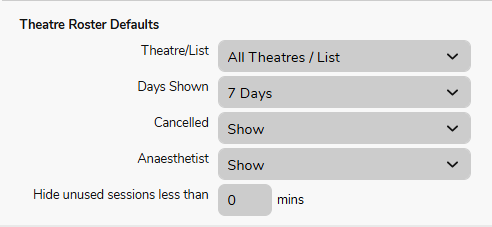
FYDO has also introduced a setting that allows you to set default preferences for these Monthly View options. You can find this under System Configuration > Heading: Theatre Roster Default. This allows you to choose which filters and viewing options are automatically applied when opening the Monthly View.
At the moment, the default is set to show everything, but you can customise these settings to suit your facility’s preferences and the information you need to view.
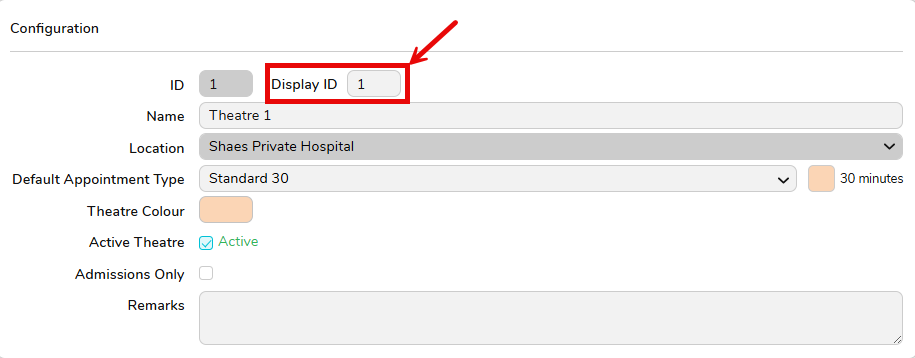
There is also the ability to modify the theatre session number to make it easier to identify each theatre.You can do this by going to Settings > Theatre Data > Select a Theatre > Display ID.
The Display ID allows you to enter up to 3 characters, which can be letters and/or numbers. For example, you could use T1, T2, or OR1 to represent each theatre.
These are some significant changes to the Monthly View, and we encourage you to take some time to test out the new features and settings.
Your feedback would be greatly appreciated, as it will help ensure the Monthly View continues to be user-friendly and meets your facility’s needs.
Updating Health Fund Group
When updating the DRG Version for a Head of Fund under Settings > Health Fund, the change will now automatically update the DRG for all health funds listed under that Head of Fund.
For example, if the AHSA DRG is changed from 8.0 to 11.0, the change will automatically be applied to all funds under AHSA, such as AUH, CBH, etc. This means you no longer need to manually update the DRG for each individual health fund.
Billing Status Report Enhancement
The Billing Status Report has been improved to enhance performance, including faster processing and loading times, while all existing data, filters, and functionality remain unchanged.
