FYDO Hospital Update – 20/11/2026
Custom View Improvement
FYDO has made an improvement to the Custom View options for the weekly Appointment Booking View, now allowing you to choose the number of days displayed.
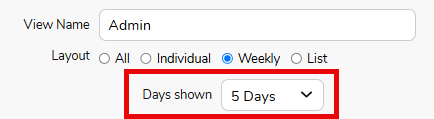
When Weekly View is selected while creating a Custom View, a new Days Shown option is now available. This allows you to choose how many days are displayed in the booking view to suit your facility’s operating hours.
For example, if your facility is only open Monday to Friday, you can select 5 days to hide the weekend from view.
This enhancement provides a clearer, more streamlined booking view by maximising the available screen space and removing days that are not relevant to your facility.
For more information on creating custom views, see our helpful instructional wiki page: Creating Custom Hospital Views in the Appointments Screen – FYDO Wiki
Multiple Theatre Visits Enhancements
FYDO has introduced enhancements to improve the visibility of multiple theatre visits when Invoicing.
When creating an invoice, the Theatre In time will now display as First Visit Time In, along with the total time for the first visit.
Where multiple procedures have been recorded, this will then be highlighted, with the total time for all procedures also displayed for easy reference

My Health Record – Episode Stats Addition
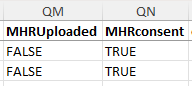
FYDO has now introduced two additional fields to the Episodes Status Reports when exported to Excel Raw Data:
- MHR Uploaded – Column QM: Indicates whether the My Health Record (MHR) has been successfully uploaded for that episode.
- MHR Consent – Column QN: Indicates whether consent has been provided for the particular episode.
These additional fields allow facilities to generate a report that logs all MHR uploads.