FYDO Hospital Update – 26/03/2026
Billing Screen Addition
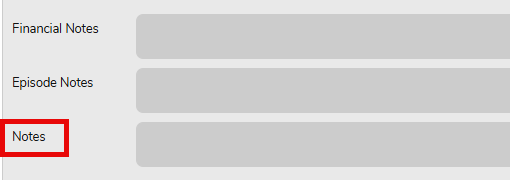
When creating an invoice, FYDO now display any notes entered on in the Notes section on the Theatre Screen. This ensures all relevant information is clearly displayed in one place, reducing the risk of omissions during the billing process.
SMS Automation Enhancement
When setting up an SMS Automation, “To Confirm Appointment“, users are now able to decide if the automated SMS is sent to all patients (new option) or only sent to patients that have not yet confirmed (historic function of the To Confirm Appointment Automated SMS).
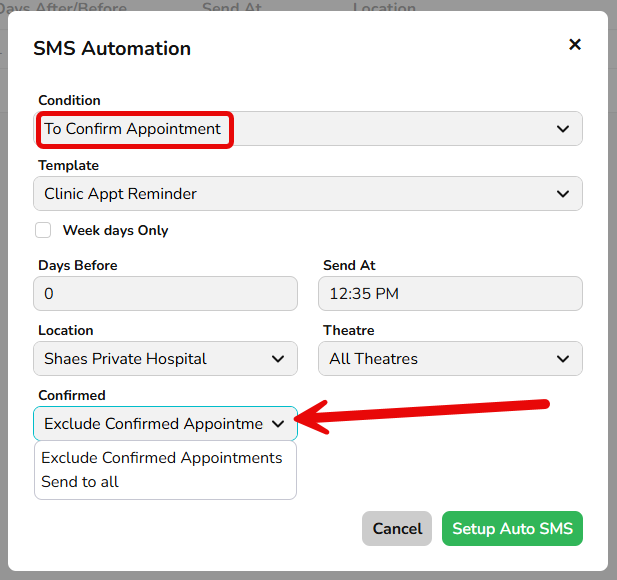
Utilising the new Confirmed field, the user will be able to set the automation to:
- Send to all and the SMS Automation will be sent to all bookings regardless of their confirmation status.
- Exclude Confirmed Appointments and the SMS Automation will only be sent to patients that are yet to confirm their appointment.
This ensures that patients can receive an SMS and reply to it, then also receive an additional SMS for a separate reason.
Unbilled Revenue Improvement
An addition has been made to the Unbilled Revenue to obtain Interim Revenue data. This allows facilities with long stay patients to view revenue within a specific period. For example, if a patient was admitted in January and discharged in March, running the report for February will display only the revenue accrued during February.
To use this correctly, set the Episode Type to Admitted and Discharged (Interim) and ensure the report is run in Detailed format.
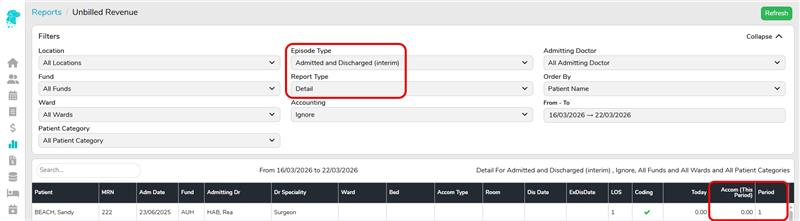
This functionality is particularly useful for long-stay patients, as it allows you to identify the portion of accrued revenue within a selected reporting period.
IHI Check Box Function
The IHI Check button retrieves the patient’s IHI number, status, and last updated date, and it now automatically triggers the patient webhook. This means the updated IHI details are now sent without needing to manually edit and re-save the patient record.