

FYDO Webhook URL Verification
The new Webhook URL Verification feature will be released on 7 October 2026. From 8 October 2026, verification will be required for all new webhook URLs added in FYDO.
Existing webhook URLs will continue to remain operational as normal unless
- the webhook URL is changed or
- the Recipient Group Secret is regenerated/rotated.
at which point verification is required
What is changing?
A webhook URL must have a status of Verified before FYDO will send normal webhook events to it.
Why are we making this change?
Webhooks send patient and operational data from FYDO to external systems. Verification makes sure that data is only delivered to an endpoint that has proven it is the intended recipient.
Before a webhook URL starts receiving events, the receiving system must show that it controls the endpoint and holds the shared Recipient Group Secret. This helps prevent:
- data being sent to an incorrect or mistyped URL
- delivery to an endpoint that accepts any request without checking it
- a webhook being enabled for a system that hasn’t been set up to receive data securely
It adds a further layer of protection alongside HMAC signing, and supports our obligations to protect personal and health information.
1. Add the webhook URL
Configure the webhook URL in FYDO as normal.
Webhook URLs are grouped by their Recipient Group Domain. Each recipient group has its own Recipient Group Secret. All webhook URLs belong to that recipient group use the same Recipient Group Secret for verification.
2. Configure the Recipient Group Secret
FYDO > Settings> Security, this can be accessed by FYDO subscriber or shared via 1Password (or other secure way) by the Altura Support team. The receiving system must use this same secret when generating the HMAC-SHA256 response for webhook verification.

3. Select Action → Verify
Once the new webhook URL is added in FYDO, status will set as “Pending”, use: Action → Verify

FYDO will send an HTTP POST request to the webhook URL, the verification request will look like

For example:

- Challenge: A unique challenge value generated by FYDO for that verification attempt. The challenge value is valid for 5 minutes from the time it is issued.
- ExpiresAt: The time at which the verification challenge expires
4. Generate the verification response
When your system receives the verification request, it must:
- Read the challenge value sent by FYDO
- Use the Recipient Group Secret as the HMAC Key
- Generate an HMAC-SHA256signature from the challenge
- Convert the result to lowercase Hexadecimal
- Return the original challenge and generated signature
In simple terms

The response must use this format

For example:

Response requirements
The receiving endpoint must:
- return HTTP 200
- return the response within 10 seconds
- return the same challenge value sent by FYDO
- generate the signature using the correct Recipient Group Secret
- return the signature as lowercase hexadecimal
5. FYDO validates the response
FYDO generates its own HMAC-SHA256 signature using the same challenge and Recipient Group Secret. If the returned signature matches FYDO’s calculation, the webhook URL is marked as Verified.
Normal webhook events can then be delivered to that endpoint.
6. What happens if verification fails
If verification is unsuccessful, the webhook URL will remain Pending/Failed and normal webhook events will not be sent to it.
The reason for the failed verification can be viewed in FYDO settings > VIEW FAILED LOGS
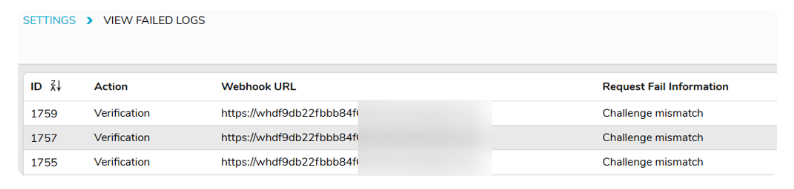
Common causes include
- webhook URL is unavailable
- endpoint does not return HTTP 200
- response takes longer than 10 seconds
- challenge returned does not match the challenge sent from FYDO
- incorrect Recipient Group Secret
- incorrect HMAC-SHA256 Calculation
- signature returned in the wrong format
- verification challenge has expired
Once the issue has been corrected, select Action > Verify again to retry

