

FYDO Hospital Update – 20/08/2026
Patient Search Addition
FYDO now allows you to search for patients using their Membership Number. To utilise this new search option, simply enter MEM: followed by the patient’s membership number into the search bar.

Overnight Banding Update
FYDO has introduced updated logic for DVA Per Diem Overnight invoices. When creating an invoice for a Per Diem Overnight charge, FYDO will now determine the accommodation charge based on the highest-priority patient class/accommodation, rather than using the banding as the primary factor.
The Patient Class/Accommodation now takes priority over the banding, ensuring that the correct accommodation rate is selected when generating the invoice.
Cancer Registry for Northern Territory
FYDO has introduced the Northern Territory Health Cancer Registry screen, designed to support cancer registry data entry for Northern Territory facilities.
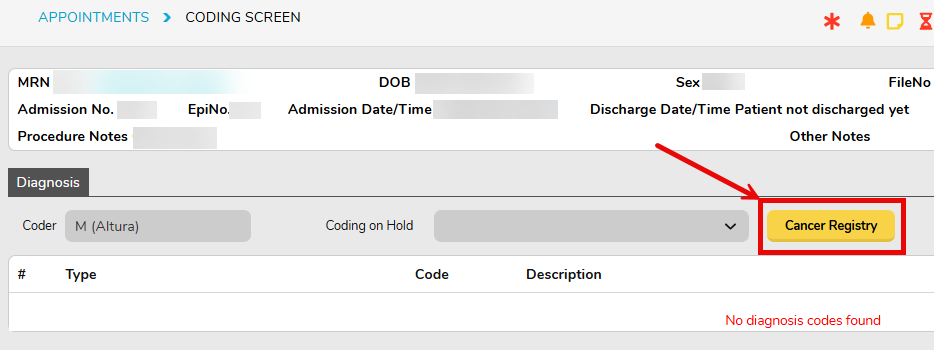
We’re pleased to let you know that FYDO will support exporting this data file, using the same process as the other end-of-month data extracts.
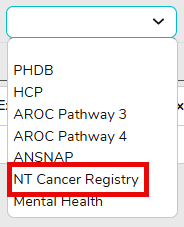
This update means that reporting to the NT Cancer Registry will be a seamless and efficient process for our Northern Territory hospitals.
New Tokens
FYDO has introduced several new tokens:
- Tomorrow’s Date – There are two new tokens that will display tomorrow’s date and tomorrow’s day, based on the current system date. These can be located in our Wiki under Tokens – Hospital > Episode Appointment Details.

- Theatre Roster – These tokens will only pull the information from the Theatre Roster (not the Theatre Screen). These tokens can be located in our Wiki under Tokens – Hospital > Theatre Roster.
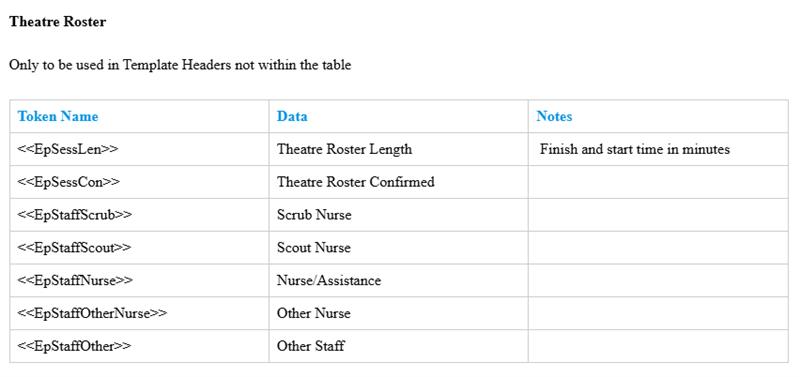
- Patient’s Middle Name – These tokens will display the patient’s middle initial and the patient’s full middle name. These tokens can be located in our Wiki under Tokens – Patient.

- HPI-O and Doctor’s HPI – This token will display the organisations HPI-O number and the Doctor’s HPI number. These tokens can be located in our Wiki under Tokens – Hospital.

Bed Occupancy Report Improvement
FYDO has implemented a refreshed design for the Bed Occupancy Report. This new design delivers improved performance, including faster processing and loading times, while all existing data, filters, and functionality remain unchanged.

Incomplete Report Enhancement
FYDO has added a new column to the Incomplete Report for the Doctor Speciality.
This additional column makes it easier to identify the treating doctor’s speciality directly within the report, providing greater visibility when reviewing incomplete episodes and outstanding information.

MHR Improvement
FYDO will now prompt you when changing a patient’s MHR Consent Status, asking whether you would like to apply the change to all episodes for that patient.
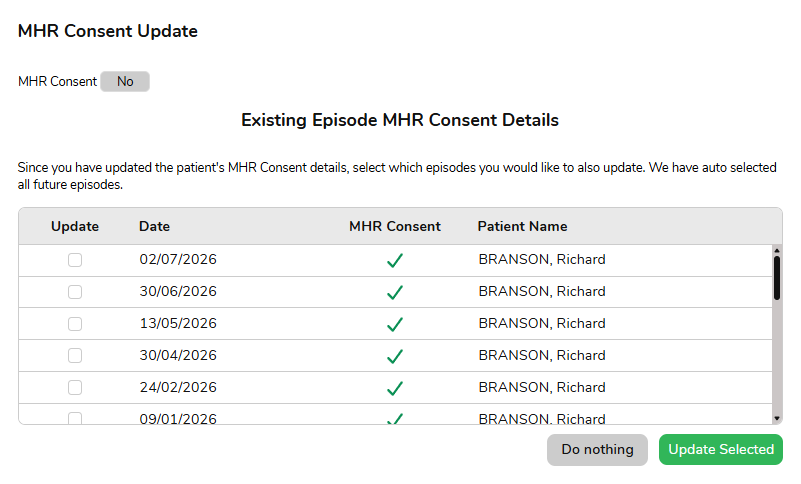
This provides greater control when updating consent and helps ensure the change is applied consistently across the patient’s episodes when required.
Patient Alerts Change
To avoid confusion with the Patient Alerts located within the Patient Details Screen, Preadmit Patient Alerts will now be relabelled as Patient Flags.
This change is intended to make the distinction between the two features clearer and help users easily identify the correct information when working within FYDO.
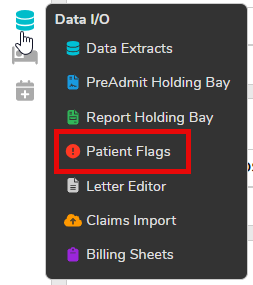
In addition, amendments to Patient Flags will now be displayed in the Audit Logs. The audit log can be accessed by navigating to Settings > Logs. This allows users to review the history and changes associated with Patient Flags, providing greater visibility and traceability when managing patient information.

