
FYDO Hospital Update – 25/06/2026
Report Holding Bay
FYDO now has the capability to receive endoscopy reports directly back from Endobase through the Report Holding Bay. This integration allows reports to be transferred more efficiently into the system, improving workflow processes and ensuring important documentation is more easily accessible and managed within FYDO.
Email Set Up required for Documents
We’re pleased to let you know that FYDO’s new email integration is now live and available to use when sending Documents.
This new feature allows FYDO to securely send emails directly through your Microsoft 365 (Outlook) account, offering improved reliability, security, and better alignment with your organisation’s IT policies.
To continue sending emails from FYDO Documents, you will need to verify the email address you wish to send from in your FYDO profile. Please follow our setup guide to complete this process.
In addition, FYDO now supports customised email footers, including the option to add your company logo. Facilities can set up a universal footer for all users, or individual users can create their own personalised footer.
Please refer to our WIKI Manual for step-by-step setup. If you have any questions or need assistance, feel free to reach out.
Checklist Addition
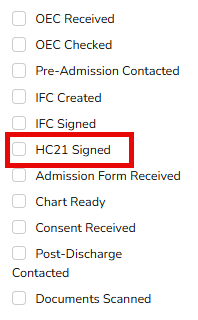
FYDO has now introduced an additional checklist field for HC21 Signed. This enhancement has been implemented to improve workflow efficiency and provide clearer visibility over the completion status of important documentation, ensuring greater accuracy and compliance in your processes. For our customers utilising the Digital IFC feature and sending HC21s to patients to sign, the next part of this development piece will see the box automatically tick when the HC21 is signed and received from Preadmit.