

My Health Record – Adding your Doctors HPI-I to FYDO
In order to upload Discharge Summaries to My Health Record Clinical Staff (Doctors/Surgeons) will need to supply the facility with their Healthcare Provider Identifier – Individual (HPI-I). Doctors can find out what they HPI-I is by calling Healthcare Identifiers on 1300 361 457 or they can get it from AHPRA.
This number needs to be entered into FYDO by following the instructions below.
Navigate to Settings
Select Doctors
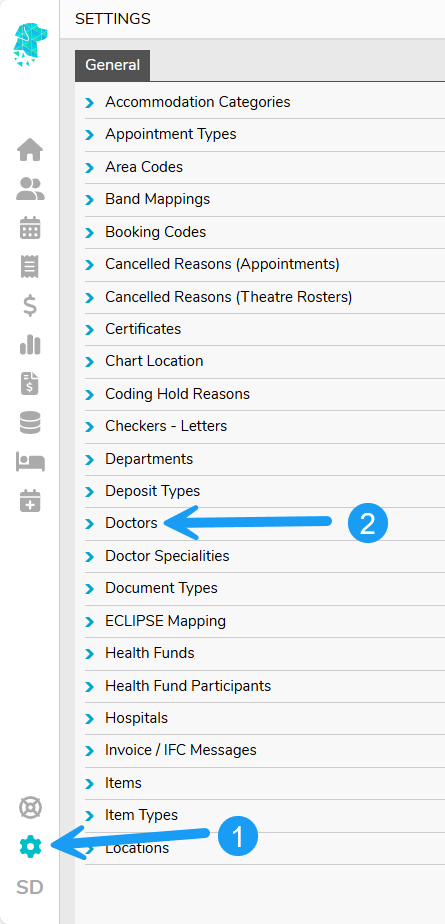
Double click on the required Doctor & select Edit

Type in the Doctors HPI-I, under the section Health Identifier, and click Save
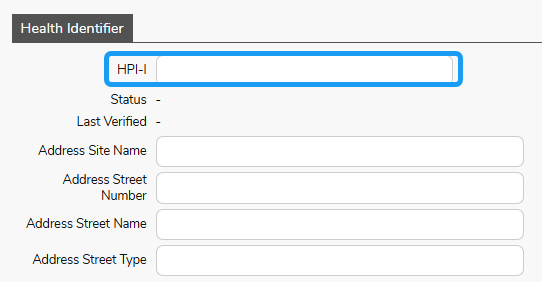
FYDO will automatically run an internal check, to ensure the HPI-I follows the required format, when you click save. If the number doesn’t meet the requirements, you will be given an alert.
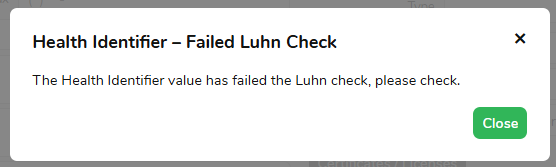
You will then need to either correct the HPI-I or remove it to be able to save the rest of the information.
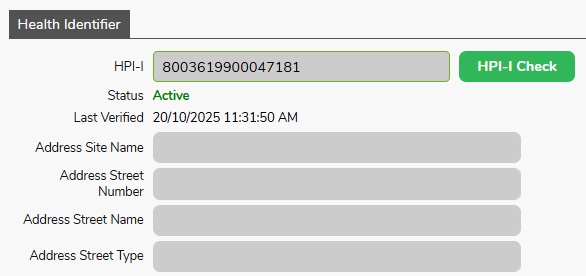
If the number was able to be saved, you can utilise the HPI-I Check button to verify the number. A successful verification will be identified with a GREEN boarder, and the Status and Last Verified date and time also be displayed.
For more helpful information related to My Health Record visit our associated wiki pages to:
Add your organisations HPI-O to FYDO here.
Check a patients IHI in FYDO here.
Upload a discharge summary in FYDO here.

